C:\1980S\MICROSOF.TXT
1983
Microsoft Word (1983): Bringing the Mouse into Word Processing
How the first Word joined selection, formatting properties, and a limited screen preview—and why its original manual complicates the usual WYSIWYG story.
Making a sentence bold sounds like a small request. An editor must know which characters belong to the sentence, what bold means, how to represent it on the screen, and how to ask a particular printer to produce it. The writer would prefer to discuss none of these arrangements.
Microsoft’s first Word tried to make that request feel direct: select some text, then change its properties. A mouse helped point to the relevant words. Formatting feedback helped explain the result. The IBM PC’s display hardware placed limits on how convincing that feedback could be.
Word appeared in autumn 1983, initially under the Multi-Tool Word name. Microsoft’s current history uses October 25 as its anniversary date.1 This was the DOS/Xenix-era product, years before Word for Windows. The familiar name can make the early software look more familiar than it deserves.
A good idea arrives on a less obliging machine
Charles Simonyi brought experience from Xerox PARC, where he and Butler Lampson had worked on Bravo for the Alto. That machine combined a mouse and a bitmap display with an environment in which visual text editing could be explored. Simonyi joined Microsoft in 1981 and hired Richard Brodie, who had worked under him at Xerox.2
The new program drew on that experience, but its authors describe writing Word afresh. In separate 2008 interviews assembled by Benj Edwards, Simonyi describes leading the development; Brodie says he wrote much of version 1, with Frank Liang responsible for much of the printing code and additional developers joining toward the end.3

Charles Simonyi, December 13, 2006, in a later NASA portrait. NASA photograph JSC2006-E-53965, via Commons; public domain in the United States. The supplied Commons file is an extracted portrait; no additional alterations.

The Alto experience supplied both ambition and a difficult comparison. Word’s authors wanted property-based formatting and useful visual feedback on much more constrained displays. Simonyi’s retrospective description is candid about those limits. Brodie’s recollection of portability is also useful, although his remembered Apple II release is challenged within the interview itself. It should not become evidence that an Apple II edition actually shipped.
The dependable product evidence is less glamorous: Microsoft’s original 1983 manual. It describes the IBM PC/XT edition, an optional Microsoft Mouse, multiple display configurations, and a working method organized around selections and commands.4 Reading it corrects several claims that later summaries repeat too confidently.
Select the object, then perform the action
An editor needs a way to indicate what an operation affects. In Word, the selection supplied that target. The mouse could select text and choose commands, while keyboard methods provided another route. The manual treats both methods as ordinary ways to work; owning a mouse wasn’t a condition for writing a document.4
The sequence is conceptually simple. First establish a target. Then choose an operation. The target may be a character, a word, or a longer piece of text. The operation might delete it or change how it is formatted.
Consider an invented sentence:
The revised estimate is ready.
Suppose only “revised estimate” should be emphasized. Represent the document, for explanation, as characters plus properties:
Text:       The revised estimate is ready.
Selection:      [revised estimate]
Operation:  Apply bold to the selection
Result:     Same characters, different formatting properties
This is a teaching model, not Word 1.00’s internal data structure or a transcription of its screen. Its point is that the words can remain the same while their presentation changes.
That distinction makes reversible editing easier to reason about. Deleting removes selected material. Formatting changes an attribute. Copying preserves the original and supplies material for another location. The user doesn’t need to retype the sentence simply to alter its emphasis.
The interaction also has a failure mode: the command can be right and the target wrong. Select the adjacent space or the next paragraph, and a faithfully executed operation still produces an unwelcome result. A visible selection is therefore part of the explanation of the command. It shows what the software thinks you meant.
The original Word offered Undo, but the manual describes reversing the most recent change. That is a narrower promise than a modern history containing many earlier operations.4 The distinction matters to the user’s confidence: one recoverable mistake does not mean that an afternoon of experiments can be unwound at leisure.
The display could help without becoming the page
The original manual explicitly distinguishes display configurations. With a color/graphics adapter, high-resolution graphics could show character attributes including bold, italics, and underline, but it couldn’t display different fonts. In color mode, some attributes were indicated by color; on the monochrome display configuration, bold was intensified and other character formats were shown by underlining.4
The mouse didn’t create those rendering capabilities. It was an input device. The display adapter and chosen mode determined what the screen could represent. This seems obvious when stated, which makes it particularly worth stating in a history whose later retellings sometimes tie every visual feature to the mouse.
A preview has several levels of fidelity. It can preserve the exact characters. It can indicate emphasis. It can reproduce character widths and shapes. It can match line breaks and page boundaries. These are related promises, but each adds requirements.
For a deliberately simplified example, compare iiii and WWWW. A fixed-width display gives both four equal character positions. A proportional printer may give the second word considerably more width. Even if the screen clearly marks both words as bold, that doesn’t establish that their widths will match the printed result.
Once widths differ, line breaking can differ too. An extra word might fit on the screen and move to the next line in print. That can change paragraph height and the position of later material. The gap isn’t repaired by adding a more visible pointer.
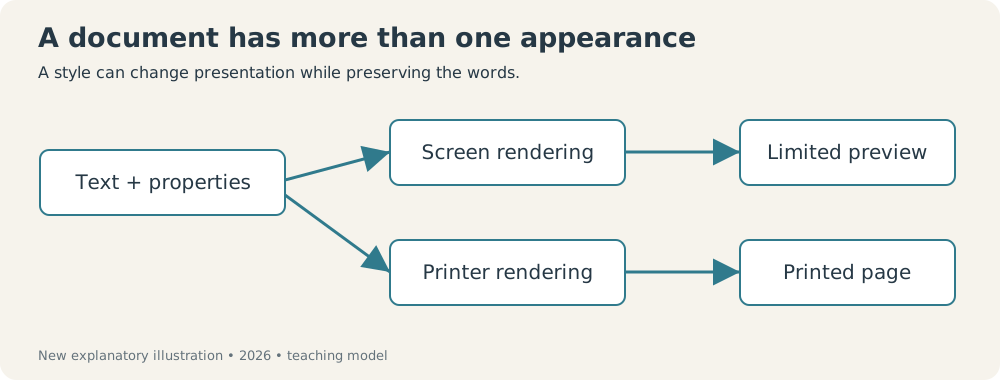
New explanatory illustration, created in 2026. It describes the screen/print distinction; it is not a historical Word screenshot or a diagram recovered from Microsoft’s source.
This is why I find the original Word’s partial preview more interesting than an unrestricted WYSIWYG label. It made selected aspects of the formatting visible while leaving important aspects of the finished page to the output machinery. The improvement was real, and so was the boundary.
A style preserves a decision
Early Word’s style sheets added another layer to the same idea. The manual describes reusable formatting definitions and a gallery of styles.4 A document didn’t have to be formatted by making every decision again for each paragraph.
Here is an original example of the reasoning, rather than an exact Word command sequence. A report has twelve section headings. Each should use the same emphasis and spacing. If those choices are applied independently, a revision means visiting twelve places, remembering the intended settings, and hoping the thirteenth heading added later follows them.
A named style gives the decision a reusable home. The heading refers to the shared rule. Changing that rule can revise the presentation consistently instead of relying on a series of separate repairs.
| Author’s decision | Direct formatting approach | Style-based approach |
|---|---|---|
| Make every section heading consistent | Repeat settings at each heading | Assign a common definition |
| Change the heading’s presentation | Revisit the affected text | Revise the common definition |
| Explain the convention to a colleague | Describe several settings | Point to the reusable rule |
This table explains the general tradeoff, not a claim that Word 1.00 had modern style inheritance, ribbon controls, or today’s document formats.
The cost is indirection. A paragraph’s appearance may depend on a rule stored somewhere else, which can make an unexpected change less obvious. Reuse saves effort by sharing decisions; it also shares the consequences of a mistaken decision. Consistency is valuable, but it is quite capable of being consistently wrong.
That tradeoff is especially relevant to long documents. A style can express editorial structure—these are headings, these are ordinary paragraphs—while presentation remains revisable. The important work moves from manipulating each visible instance to maintaining the rules that connect them.
The printer remains part of the system
The original manual treats printing as a central concern, including how character formatting is approximated when a printer cannot reproduce it. Font and positioning capabilities matter at output even when the screen doesn’t fully show them.4
An invented example makes the boundary clear. A document asks for italic text. Printer A supports an italic face. Printer B doesn’t. Both can receive the same authorial intention, yet their output may differ. The editor must either substitute, omit, or otherwise approximate what it cannot deliver.
This is a software contract with a physical device, and the device gets a vote. A document model can store more detail than one printer can render. That is useful for carrying work forward to a better device, but it prevents a simple claim that every preview or printer will produce the same page.
The presence of dedicated printing work in the development accounts is therefore unsurprising. Selecting a phrase is the visible interaction. Producing dependable output is much of the engineering behind it.
A promising interface isn’t an automatic market victory
Word entered a market where users already had tools and habits. The Computer History Museum describes mixed early reception and reports the November 1983 PC World demonstration distribution. It also distinguishes the DOS product’s position from the later Windows product’s success.2
A familiar competitor gives a user more than a feature list. It gives them remembered commands, existing documents, and confidence about what the printer will do. A different editing model has to repay the cost of relearning those arrangements. Technical ambition doesn’t make that cost vanish.
Dates also need restraint. Microsoft’s present history uses October 25, 1983; the historical product documentation anchors the edition in 1983, and museum accounts place the DOS launch in autumn. These records don’t establish a neat Xenix-first commercial sequence merely because the development environment was Xenix.13
Later Macintosh and Windows editions carried the name into different graphical environments. Word for Windows arrived in 1989 and receives its own article in this series.2 The shared name connects the story, but the original product’s limitations remain worth examining rather than smoothing away with later success.
The 1983 achievement was an editing model that made targets and formatting decisions more explicit on affordable hardware. It showed how much a limited preview could accomplish, and how much work remained between a good-looking sentence on screen and a dependable page. The mouse was an invitation to point at the problem. The rest still required software.
Sources
Footnotes
-
Microsoft, “The history of Microsoft Word”. Current corporate October 25 anniversary statement; generalized claims about the original GUI are checked against the original manual instead of repeated uncritically. ↩ ↩2
-
Leonard J. Shustek, “Microsoft Word for Windows Version 1.1a Source Code”, Computer History Museum, 2014. Historical account of Bravo, Microsoft’s team, the original DOS release/reception, and later Windows product. Its compressed mail-merge feature list isn’t used to assign mail merge to version 1.00. ↩ ↩2 ↩3
-
Charles Simonyi and Richard Brodie, 2008 interviews conducted by Benj Edwards, published 2015. Separate email interviews edited into a composite; explicitly includes a correction to Brodie’s remembered Apple II release. ↩ ↩2
-
Microsoft, Microsoft Word 1.00 for DOS Manual, 1983, preserved by Edward Mendelson at Columbia. Inspected operating-information requirements and display-mode discussion, chapters on selections/formatting/style sheets, and Undo. Primary product documentation; the tutorial concepts are explained in new examples rather than copied. ↩ ↩2 ↩3 ↩4 ↩5 ↩6