C:\1980S\MSDOS.TXT
1981
MS-DOS: How a Small Operating System Became an Industry Foundation
From Tim Paterson’s 86-DOS to IBM’s PC DOS: how a modest operating system, compatible applications, and a licensing strategy helped shape personal computing.
A computer that can run a spreadsheet is useful. A computer that can run the spreadsheet your supplier uses, open last month’s files, and survive next year’s hardware purchase is a considerably better business proposition.
Early DOS helped establish that second kind of usefulness. Its screen contributed very little to the sales pitch: a drive letter, a prompt, and ample opportunity to misspell something. The consequential part was the agreement underneath. Programs could ask for files and services in a recognizable way, and manufacturers could supply machines on which those agreements held.
The story spans Tim Paterson’s work at Seattle Computer Products, Microsoft’s adaptations and licensing, and IBM’s personal computer. It also reveals a persistent engineering problem: exactly how much compatibility does a compatible machine need?
A problem before a platform
In 1980, Tim Paterson was working at Seattle Computer Products, which needed an operating system for its Intel 8086-based hardware. Digital Research’s anticipated CP/M-86 was not yet available, so Paterson wrote a system initially called QDOS and later 86-DOS.1
The name changed more readily than the immediate objective: make the computer useful by giving programs a way to load, work with files, and perform input and output.
Meanwhile, Don Estridge’s IBM team in Boca Raton was assembling a personal computer using outside components and software. The IBM PC was unveiled on August 12, 1981.2
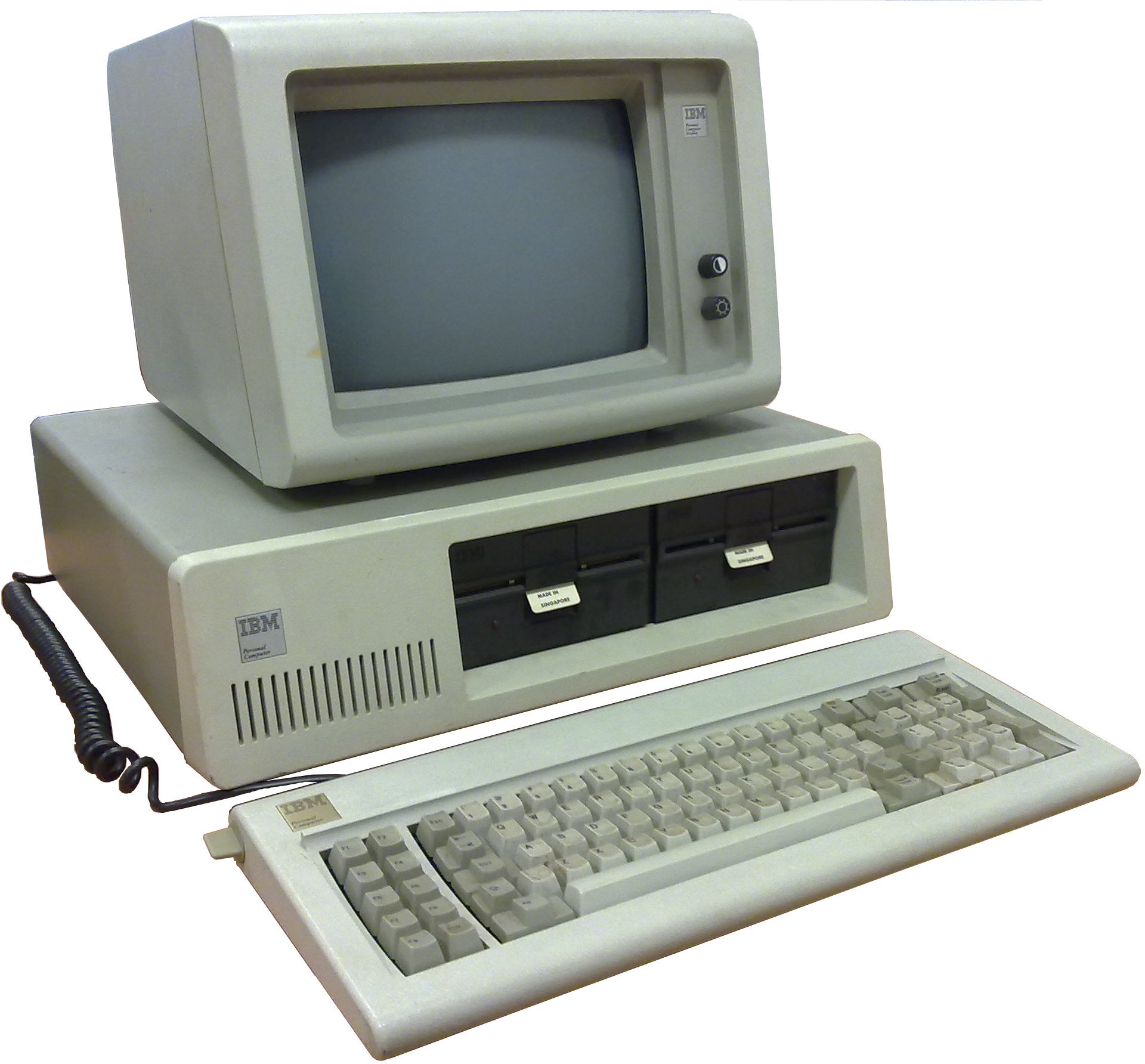
IBM 5150 with 5151 monitor, photographed February 24, 2010 by Ruben de Rijcke. Source, CC BY-SA 3.0. Background removed by Gwolf in the Commons version; no further alterations. A later photograph of the hardware, not a 1981 launch image.

Microsoft did not already possess the operating system IBM needed. It licensed 86-DOS, subsequently acquired its rights, and worked with IBM to adapt it. The IBM-branded release shipped as PC DOS 1.0; Microsoft used MS-DOS for versions licensed to other manufacturers.1
Paterson’s initial system drew on CP/M’s documented interfaces to help programmers translate existing applications. That did not mean an 8-bit CP/M executable could simply run unchanged on the new processor.3
What was actually inside DOS?
At its core, DOS provided file-management services and a way to load and execute applications. Its command interpreter, COMMAND.COM, supplied the interface through which users issued commands.4 The prompt was a doorway into the system, not the whole system. Confusing the two is rather like judging a restaurant entirely by the person who answers its telephone.
An illustrative session might look like this:
A>DIR
A>COPY REPORT.TXT B:REPORT.TXT
The first command lists files. The second copies a named file to another drive. These are illustrative commands, not a recorded session.
The distinction between the command interpreter and the operating system matters. A spreadsheet did not need to express every request as a command a person would type. It could call DOS services directly.
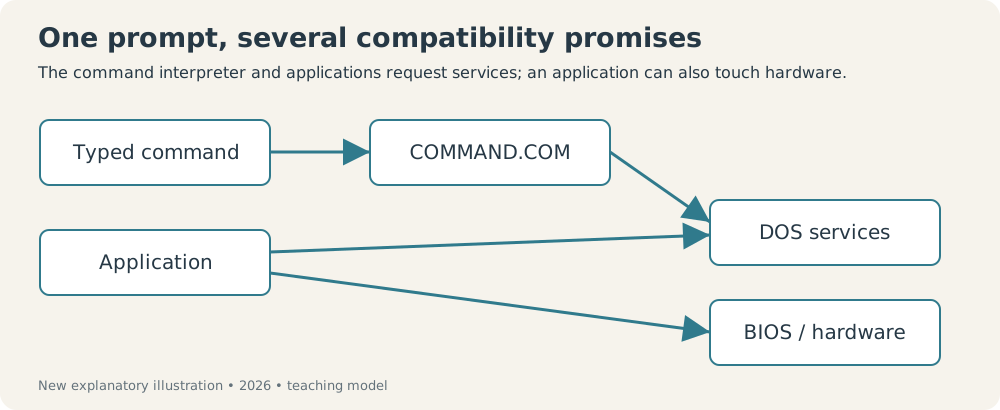
New explanatory diagram, created for this series in 2026; not a historical screenshot. The direct hardware route explains why DOS compatibility alone could be insufficient.
A small window into the programming interface
One DOS service used software interrupt 21h. The programmer placed a function number in the AH register, supplied any required arguments, and executed the interrupt instruction.5
For example, function 09h, available in DOS 1.0 and later, displayed a string terminated by a dollar sign:
; Illustrative fragment, not a complete executable.
; Assume DS already points to the segment containing message.

mov ah, 09h
mov dx, offset message
int 21h

message db 'Hello from DOS!$'
DS:DX identifies the string’s location. DOS prints its characters up to, but not including, $. In DOS 1.x, this service sends text to the display; DOS 2.0 and later support redirecting it through standard output.5
The important idea is the shared interface: a program can ask the operating system for a service instead of implementing that service entirely by itself.
That abstraction was incomplete. Applications could also use BIOS calls or access hardware directly, so sharing DOS did not automatically guarantee that two computers could run every identical program.3
The constraints were real
DOS ran in the environment of the 8086 and 8088, whose segmented addressing combined a segment value with an offset. In ordinary real-mode addressing:
For example:
The processor’s 20-bit address bus could address bytes, or 1 MiB. That was an address-space ceiling, not a promise that the entire space was installed RAM or available to an application.6
Early DOS also lacked the protected separation between applications and the operating system expected in modern systems. Its small size and directness came with compromises: a faulty program could interfere with memory beyond its own intended data.6
DOS 2.0: growing beyond the floppy disk
It is easy to read later DOS capabilities backward into 1981. The original PC DOS supported floppy disks; hierarchical subdirectories and hard-disk support arrived with the major 2.0 revision, released alongside IBM’s PC XT in March 1983.1
That changed the kind of information a user could organize. A small collection of files on a removable disk was one problem. A growing body of work on a hard disk required a more structured solution.
DOS 2.0 also introduced file handles, providing a more flexible interface for accessing files and devices than the older file-control-block approach.5
Its standard-input and standard-output mechanisms enabled redirection and command pipelines. For instance:
DIR > FILES.TXTInstead of merely displaying a directory listing, this DOS 2.0-or-later command saves it to a file. Batch files let users assemble repeated commands into a reusable procedure.4
None of these ideas was new to computing as a whole. Their importance here was bringing useful capabilities into a growing personal-computer environment.
The feature that did not fit on a specification sheet
Microsoft retained the ability to license DOS to manufacturers beyond IBM.1 IBM, meanwhile, published technical documentation that helped outside companies build peripherals and compatible systems.2
These decisions reinforced each other. More machines created a larger potential audience for applications. More applications made those machines more attractive. Skills, purchasing decisions, and software investment could accumulate around a common platform.
Lotus 1-2-3 provides a concrete example. Released in January 1983 by Mitch Kapor and Jonathan Sachs’s company, it combined spreadsheet calculations, charts, and basic database operations. Its popularity helped make the IBM PC useful to businesses, and it became a demanding test of clone compatibility.7
DOS did not succeed in isolation. It participated in an ecosystem in which hardware, applications, distribution, and user familiarity supported one another.
Compatibility has several addresses
Consider an invented application that keeps a customer list. Its file operations go through DOS, but its screen updates write directly to display memory. On machine A, both paths work. Machine B implements the DOS file interface accurately yet places its display elsewhere. The file loads; the screen misbehaves. A vendor could honestly advertise DOS support and still sell an unusable home for this particular application.
That example separates three promises: the operating-system call behaves correctly, the firmware behaves correctly, and the hardware behaves correctly. Applications decide which promises they rely on. A manufacturer cannot discover its real compatibility obligations solely by reading the name on the boot disk.
There is an economic trap here. A developer can gain speed by relying on a specific device. Users then judge competing machines by whether that fast application works. Hardware makers have reason to reproduce the device’s behavior, which makes the developer’s original shortcut increasingly safe. A practical requirement can become an industry convention without anyone voting on it.
I find that feedback loop more revealing than the prompt’s austerity. DOS gave the ecosystem a common vocabulary, while popular applications helped determine how literally the surrounding machinery had to speak it.
The small interface leaves a large responsibility
The assembly fragment above also shows the difference between an interface and protection. A register containing an address tells DOS where a string begins. It doesn’t establish that the address is sensible or that the programmer remembered the terminator. The contract is useful because many programs can use it; the contract still assumes competent callers.
The dollar sign is a particularly economical bargain. DOS can discover the end of this string without receiving a separate length. The caller, however, has lost the ability to put an ordinary dollar sign inside that same string and have this service print it as data. Other output services offer different contracts. A convenient shortcut has quietly selected which messages are convenient.
This teaching fragment deliberately omits program startup, segment initialization, and exit. Putting three instructions on a page is excellent for explaining a request and quite insufficient for shipping an executable. Small historical interfaces deserve that distinction; otherwise their simplicity becomes an optical illusion.
The same is true of memory addressing. The arithmetic can produce a location, but it cannot make that location private. Without enforced separation, a mistaken write can damage something that belongs to the system. Direct access makes certain work easier while handing more responsibility to each program.
An investment that could follow the user
DOS’s commercial importance depended partly on Microsoft’s retaining the ability to license the system beyond IBM. An application interface becomes much more valuable when the next machine can implement it too.1
A buyer could accumulate documents, applications, and learned habits around that interface. Each successful migration increased confidence in the next one. Each incompatible peripheral or program demonstrated where the agreement ended. Compatibility was experienced through particular work, not a philosophical commitment to standards.
This also helps explain why a small operating system could be influential without containing everything a modern system contains. Some of its value existed outside its code: in manuals, applications, manufacturing choices, and the expectation that a purchase would remain useful.
The tradeoff is easy to recognize in any long-lived platform. Preserving yesterday’s assumptions lowers migration costs today and constrains tomorrow’s design. DOS made that bargain visible unusually early. The blinking cursor was the least interesting part of the agreement.
Timeline at a glance
| Date | Development | Why it matters |
|---|---|---|
| 1980 | Paterson develops QDOS/86-DOS at Seattle Computer Products | Supplies an operating system for its 8086 hardware. |
| 1980–1981 | Microsoft licenses and then acquires 86-DOS | Creates the basis for adapting and licensing DOS. |
| August 1981 | PC DOS 1.0 ships with IBM’s PC | Places the software on an influential commercial platform. |
| March 1983 | DOS 2.0 accompanies the IBM PC XT | Adds hard-disk support and hierarchical directories. |
Sources
Explore the code
Microsoft preserves historical MS-DOS sources in its official GitHub repository. The repository identifies versions 1.25, 2.0, and 4.0 and provides its licensing terms. Those files are useful for studying implementation; they should not be mistaken for the exact source of IBM’s first 1.0 release.
Footnotes
-
Leonard J. Shustek, “Microsoft MS-DOS early source code”, Computer History Museum, March 25, 2014. Covers the acquisition, branding, early releases, and technical changes. ↩ ↩2 ↩3 ↩4 ↩5
-
IBM, “The IBM PC”. Corporate account of the Boca Raton team, the August 12 launch, and IBM’s published architecture. ↩ ↩2
-
Microsoft Press, The MS-DOS Encyclopedia (1988), Section I: The Development of MS-DOS, preserved by PCjs. A contemporary account, useful alongside the later museum history; it reflects Microsoft’s perspective. ↩ ↩2
-
Microsoft Press, The MS-DOS Encyclopedia, Section III: User Commands, preserved by PCjs. Reference for commands, batch processing, and redirection. ↩ ↩2
-
Microsoft Press, The MS-DOS Encyclopedia, Section V: System Calls, preserved by PCjs. Includes DOS function versions and the
INT 21hinterface. ↩ ↩2 ↩3 -
Microsoft Press, The MS-DOS Encyclopedia, Section II: Programming in the MS-DOS Environment, preserved by PCjs. Technical reference for system structure, addressing, and compatibility. ↩ ↩2
-
Computer History Museum, “Mitchell Kapor”. Documents the January 1983 release of Lotus 1-2-3 and its role in the PC ecosystem. ↩