C:\1980S\POSTSCRI.TXT
1984
PostScript: When the Page Became a Program
Adobe's page language separated the description of a design from the machinery needed to print it.
Ask two printers to draw the same circle and you immediately encounter a small philosophical problem. Do you mean the same collection of dots, or the same shape on the page? A low-resolution printer and a high-resolution typesetter cannot use identical dots to produce identical physical dimensions. One of them has considerably more dots available.
PostScript gave software a way to describe the intended page while leaving the output device to perform the final drawing. A page could contain text, paths, and sampled images, with coordinates and transformations defining their arrangement. The printer received instructions describing what to make, rather than only a finished bitmap sized for one particular machine.
Adobe released the language in 1984. Its impact became particularly visible with the desktop publishing equipment and applications of 1985. The breakthrough was a useful agreement between software and printers. Agreements rarely get handsome product photographs, but this one helped a great many handsome pages reach paper.1
Adobe’s useful common language
John Warnock and Charles Geschke founded Adobe in December 1982 after working at Xerox PARC. PostScript’s development was a team effort: Doug Brotz, Bill Paxton, and Ed Taft joined the founders in building the language and implementation. Adobe licensed the technology to manufacturers instead of requiring every page to pass through an Adobe-built computer.1
The commercial environment mattered. Apple’s LaserWriter put a PostScript interpreter inside a laser printer, while programs such as Aldus PageMaker supplied a usable way to arrange a publication. Describing a page, composing a page, and physically printing a page are three distinct jobs. Their combination made the small publishing workflow convincing.2
Calling PostScript a page description language is accurate, but leaves out a delightful complication: it is also a programming language. It has data structures, procedures, control flow, and an interpreter. A printer processing PostScript is executing a program. The paper emerging from the machine is the result of that computation.
This made descriptions compact and expressive. It also meant that receiving a page could be rather more demanding than receiving a picture. A troublesome job might contain troublesome computation. The printer had inherited some of the character of a computer, including the part where it can become occupied with something you hadn’t intended.
The stack does the bookkeeping
PostScript uses postfix notation: operands come before an operator. Consider this tiny expression:
12 8 addThe interpreter pushes 12 onto an operand stack, then pushes 8. add takes those values off and pushes their sum, 20. There are no parentheses to indicate which values belong to this particular addition; their positions on the stack supply that information.3
A stack is a structure in which the most recently added item is the first one removed. Thinking of a pile of plates is fine until you need two operands, a dictionary, and an executable procedure. At that point the actual programming model is less fragile than the crockery analogy.
The same arrangement appears in graphics commands.4 72 72 moveto supplies two coordinates before asking the interpreter to establish a current point. 216 72 lineto supplies a destination before asking it to append a line segment. The values and verbs cooperate in a small, regular language.
Here is an original teaching program using longstanding Level 1 operations:
%!PS
newpath
72 72 moveto
216 72 lineto
216 144 lineto
72 144 lineto
closepath
2 setlinewidth
stroke
showpage
It creates a rectangular path and paints its outline. In the initial default coordinate system, one user unit is one point, or 1/72 inch. The rectangle begins one inch from the left and bottom edges, spans two inches horizontally, and rises one inch. The line width is two points. This is our own example, not code recovered from a historical publication.
The path-building commands don’t immediately paint the rectangle. They construct geometry. stroke paints along that path with the current line width; fill would paint its interior instead. showpage asks the device to output the page. Keeping path construction separate from painting lets the same geometry support different visual operations.
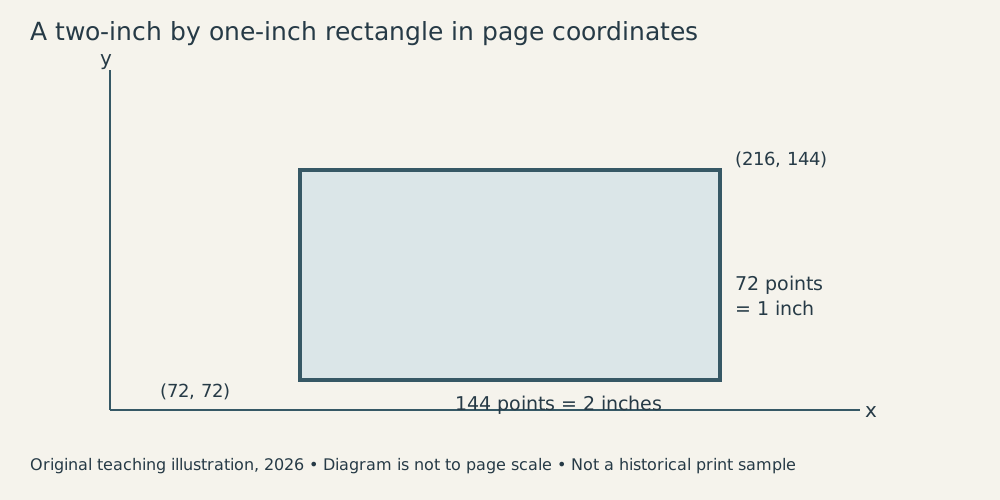
Original explanatory diagram, 2026; not a historical print sample.
Resolution belongs at the last step
Suppose our two-inch-wide rectangle goes to an output device operating at 300 dots per inch. Its width corresponds to 600 device dots. At 600 dots per inch, the same width corresponds to 1,200 dots. The geometry stays two inches wide because the output mapping changes with the device.
That is the essential benefit of device independence. The application can retain a description in page coordinates and allow each interpreter to translate it into the appropriate raster, the final grid of marked and unmarked output positions. A circle remains a mathematical circle until scan conversion decides which device pixels approximate its boundary.
There are limits to what this promises. A higher-resolution device can draw a smoother boundary. A low-resolution bitmap placed on the page doesn’t acquire missing detail because the interpreter speaks an elegant language. Enlarging sampled image data spreads the available samples over a larger area. The language keeps dimensions consistent; it doesn’t commission a replacement photographer.
Nor does device independence guarantee identical results from every machine. Fonts must be available, implementation limits can differ, and printers have physical characteristics. A description is portable because its meaning is defined at a useful level of abstraction. Reproducing a particular document still requires its resources and a compatible execution environment.
Transformations make the abstraction more powerful.4 Instead of calculating new coordinates for every component of a diagram, a program can change the coordinate system with translation, scaling, or rotation. Draw the familiar shape within the altered system, and the interpreter maps it to its new position and orientation.
For example, translating by 72 points moves an origin by one inch in the default scale. Scaling a shape by two doubles its dimensions. Combining transformations requires attention to order: moving and then rotating generally produces a different placement from rotating and then moving. These operations are convenient precisely because they concentrate geometric changes into a small number of instructions.
Type needs more than an outline
Text is where mathematical purity meets the reader’s eyes. Describing a letter with curves gives a scalable outline. But converting that outline to a coarse grid can produce uneven stems or inconsistent spacing. Two features that are geometrically equal may land awkwardly between different columns of pixels.
Adobe’s font work addressed this with information and procedures that help important features fit the device grid. The museum’s source-code release preserves an early stage of that development from February 1984, not a complete snapshot of every refinement in the commercial systems that followed. Some low-level modules are omitted; the museum explicitly documents that boundary.5
The distinction is valuable. The historical accomplishment included a practical renderer and high-quality type, alongside the public language model. Publishing a specification doesn’t automatically reproduce all the engineering that makes the result attractive. An outline says what a letter is. Rendering decides whether the small printed version looks like it was designed by someone who has seen letters before.
This is also why a screen preview and a printed page can differ in appearance while sharing the same intended layout. Their output grids differ. Good software must preserve the relationships that matter, while accepting that each device offers a different approximation of the shapes.
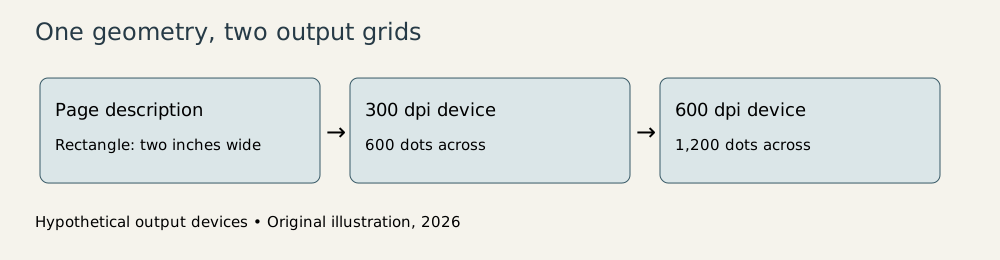
Original explanatory diagram, 2026. The resolutions are teaching examples, not specifications for a particular historical device.
The costs of an intelligent printer
Sending a compact description moves some work into the printer. The interpreter must execute the program, resolve fonts and other resources, turn geometry into raster data, and manage memory. A complex page can therefore take time even when the input file isn’t especially large. File size and rendering effort measure different things.
Repeated geometry demonstrates the difference. A short procedure can draw one object thousands of times. The textual description may remain small while the actual page requires substantial drawing. Reusable procedures are a strength of the language, but the printer still owes the page every mark the program requests.
Errors also become more specific. A missing operand, an undefined name, or an exhausted resource can stop execution. This is programming machinery doing exactly what programming machinery does. The awkward part is that its user may think they merely clicked Print.
For application developers, however, the bargain was compelling. One page model could reach multiple output devices. A graphics application didn’t need to redesign its document semantics around each printer’s private collection of control codes. Printer manufacturers could support a common ecosystem of applications.
PostScript’s contribution is easiest to appreciate at that boundary. It turned the page into a portable description with enough computational power to express real layouts. The resulting workflow allowed composition and rendering to happen on different machines without requiring the designer to personally supervise every dot. A well-chosen abstraction can have a very physical result: the right page, at the right size, coming out of a machine that understands what it has been asked to draw.
Footnotes
-
Computer History Museum, PostScript: A Digital Printing Press, founding, release year, team, and licensing history. ↩ ↩2
-
Paul Brainerd oral history, pp. 8–11, recollections of the Macintosh, LaserWriter, and PageMaker combination. ↩
-
Adobe, PostScript Language Reference, third edition, chapters 2–4 and operator entries. Used for stable Level 1 mechanisms; later Level 2/3 features are excluded from this article’s 1980s explanation. ↩
-
Adobe, PostScript Language Tutorial and Cookbook, 1985, chapters 2, 3, and 6 for operand stack, paths, and coordinate transformations. Original examples and calculations are independent of its sample programs. ↩ ↩2
-
CHM’s documentation of the February 1984 source release, section on font rendering and omitted modules. ↩