C:\1990S\JAVASCRI.TXT
1995
JavaScript: The Page Could Answer Back
JavaScript's 1995 beginnings put a small event-driven language inside the browser, connecting form fields, text conversion and immediate local feedback.
A page contains a quantity field, a price field and a button labeled Calculate. The person entering the numbers expects an answer nearby. They probably don’t care whether another computer has been consulted about multiplying three by two and a half.
For some interactions, a round trip to the server is useful. For this one, the browser already has the inputs and could perform the calculation itself. The missing piece is a way to attach behavior to the document.
JavaScript gave early web authors that kind of connection. A script could read a form field, react to an action and put a result back into the page’s controls. It made a document capable of a small local response.
The response was simple. The implications of treating text as numbers were less obliging.
Ten days established feasibility
Brendan Eich’s ten-day effort in May 1995 produced a prototype, initially called Mocha. Turning it into shipping software and integrating it with the browser took further work. LiveScript appeared publicly in the September Navigator 2.0 beta; Netscape and Sun announced the JavaScript name on December 4.1
The shared name expressed a branding relationship with Java, rather than making JavaScript a smaller edition of the same language. Java’s runtime contract and JavaScript’s browser scripting environment addressed related network-era problems through different technical designs.
The original production JavaScript 1.0 belongs to Navigator 2.0 in 1996. The participant history dates production to March, while other histories commonly give February; an exact shipping day isn’t needed for this article’s 1995 beginnings. JavaScript 1.1 followed in Navigator 3.0 later in 1996.1
That separation gives the ten-day story its proper scale. It demonstrated that the proposed language could work. It didn’t settle every host interface, edge case or bug in the language people eventually received.
Initial syntax included top-level functions, var, familiar conditionals and loops. Many familiar later facilities were absent, including object and array literals, function expressions, ===, typeof and external script src loading.1 The example below stays within an early form-oriented style instead of dressing a modern application as a 1995 discovery.
A small calculator, with a stated limit
Here is an original teaching page. It uses the form and event-handler style documented in the preserved early Netscape authoring guide. It targets the basic early production model, rather than claiming to recover Eich’s prototype.
<HTML>
<HEAD>
<SCRIPT LANGUAGE="JavaScript">
function calculate(form) {
    var quantity = parseFloat(form.quantity.value);
    var price = parseFloat(form.price.value);
    form.total.value = quantity * price;
}
</SCRIPT>
</HEAD>
<BODY>
<FORM NAME="order">
Quantity: <INPUT TYPE="text" NAME="quantity" VALUE="3">
Price: <INPUT TYPE="text" NAME="price" VALUE="2.5">
<INPUT TYPE="button" VALUE="Calculate"
       onClick="calculate(this.form)">
Total: <INPUT TYPE="text" NAME="total" VALUE="">
</FORM>
</BODY>
</HTML>
This is deliberately a calculator for well-formed example inputs, not a complete ordering service. It has no currency-rounding policy, validation, payment processing or server submission.
The early guide documents an inline button onClick calling a function with this.form. Its reference describes text-field value as a string that can be changed programmatically, with the displayed field updating.2
A button here has a specific role: cause the calculation. Its type is button, so the example doesn’t quietly introduce the separate action of submitting the form. Reading inputs and sending them elsewhere are distinct operations.
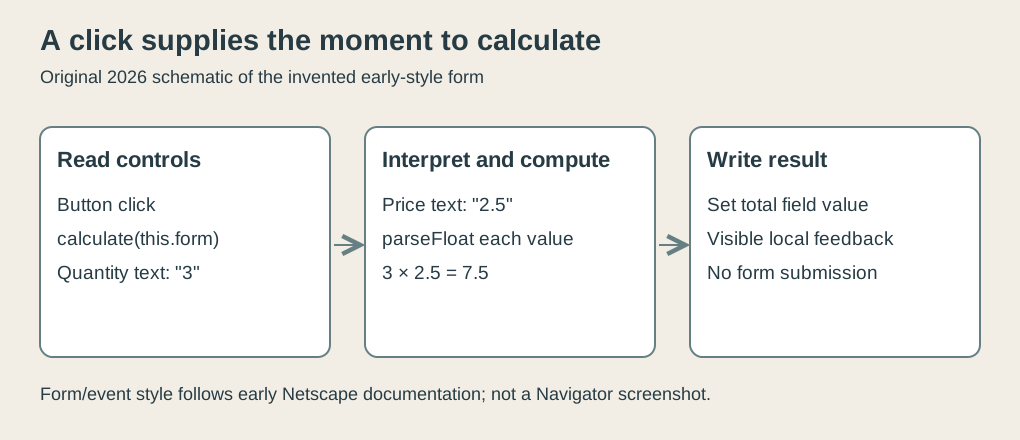
Original explanatory diagram, 2026. The invented calculator’s event flow, not a screenshot or reconstructed Navigator interface.
The function’s parameter, form, receives the containing form. That reference tells it which collection of named controls to read. We haven’t used a modern document query API or attached an event listener through a later interface.
The result goes into form.total.value. The important effect is a visible update to a form control. It doesn’t imply that original JavaScript offered today’s general facilities for editing any arbitrary element in a document.
The characters aren’t the number
The quantity field displays 3. Its value is the string "3": one character representing a numeral. The price field similarly supplies the string "2.5".
A person can read those characters as numbers. A program needs rules that establish when it should do the same thing.
Our two calls to parseFloat make the conversion explicit. With the supplied inputs, the values become numeric 3 and numeric 2.5. Multiplying them gives 7.5, which is assigned to the output field for display.
The sequence has four meaningful stages:
| Stage | Quantity | Price | Result |
|---|---|---|---|
| Read field text | "3" | "2.5" | Not calculated |
| Parse numeric values | 3 | 2.5 | Not calculated |
| Multiply | 3 | 2.5 | 7.5 |
| Display through output field | — | — | Text representing 7.5 |
This boundary between representation and meaning matters even in a tiny page. The characters are input to an interpretation, rather than a guarantee that the user has supplied a sensible quantity.
Addition makes the difference especially clear. In the language’s string-concatenating case:
"3" + "2.5"produces the string "32.5". Numeric conversion before addition instead produces 5.5. Both outcomes follow rules; only one matches a particular intention.
Multiplication can coerce numeric-looking strings too, but our function uses deliberate conversion so its intent is readable. It avoids relying on the reader to mentally apply a different operator’s conversion rules.
A script can therefore execute successfully while answering the wrong question. “No error appeared” is a disappointing standard for a calculator, although it has occasionally been promoted to an acceptance test.
Parsing doesn’t establish validity
The early reference describes parseFloat as accepting a numeric prefix and stopping when it encounters unsuitable characters. It also documents platform differences for inputs whose first character cannot be parsed: Windows could return zero where other platforms returned NaN.2
That historical wrinkle is a reason to bound the example carefully. A modern runtime’s invalid-input behavior doesn’t prove what every original Navigator installation did.
For an input such as "3boxes", prefix parsing obtains 3. A person might regard the suffix as a helpful unit, an error or a sign that the wrong field was used. The parser has merely found a numeric beginning.
Likewise, accepting "-3" as a number doesn’t establish that a shop should sell a negative number of notebooks. Accepting "2.5" as a quantity doesn’t establish that half a notebook is available. Syntax, numerical interpretation and business policy are separate tests.
Our saved checker consequently verifies well-formed example values and a chosen numeric-prefix case on modern Node. It records the environment and doesn’t claim historical invalid-input equivalence. It also tests the unchanged form values and the specific output update, so the calculation isn’t demonstrated by a disconnected multiplication alone.
A real application would need to decide its accepted grammar, range and rounding rules. That is a design job, not a longer spelling of parseFloat.
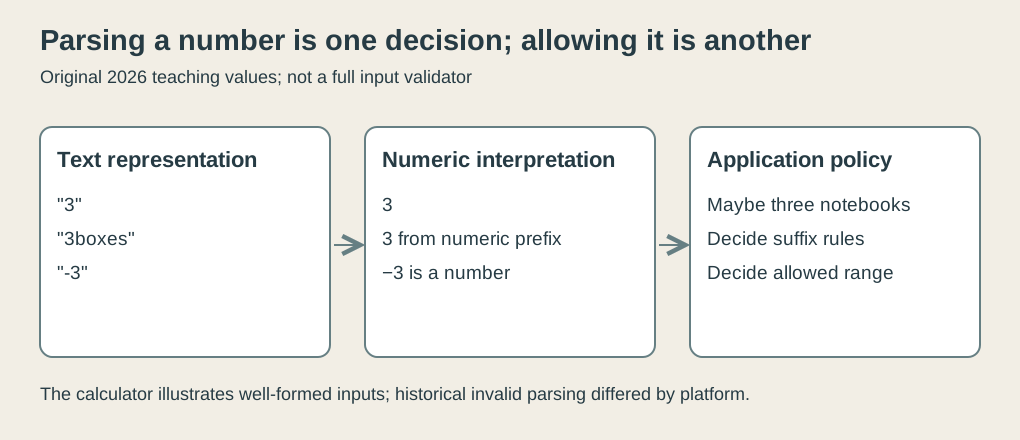
Original explanatory diagram, 2026. Selected invented values expose the difference between parsing and business validation; no historical runtime behavior is simulated.
An event supplies a moment
The calculator also illustrates why a scripting language needed a browser interface. Multiplication alone wasn’t enough. It needed access to the control values and a defined moment at which to use them.
The click supplies that moment. Before it happens, the user can change the quantity. When it happens, the function reads the current text, rather than continuing to use the original VALUE="3" written in the HTML.
Change the quantity to "4" and click again. With price "2.5", the output becomes 10. The function definition hasn’t changed; its new invocation obtains new input.
Defining a function and executing it are separate actions. The page supplies the definition, then the event causes the call. Keeping those ideas apart helps explain why a browser can load a script without immediately performing every operation in it.
The model is compact enough that the whole path is visible: control, event attribute, function, field reads, conversion, multiplication and field write. It establishes a useful relationship without requiring a framework or an elaborate program structure.
That simplicity came with limits. The available language and host objects were much smaller than the modern web platform. An original form example shouldn’t silently assume modern DOM manipulation, network APIs, promises or the browser storage facilities that arrived later.
Local feedback has a separate authority
A locally displayed total is useful feedback. It isn’t an authoritative invoice merely because the calculation occurred in a browser.
The customer controls the environment in which this script runs. They can edit inputs, and a modern investigator could reproduce or modify the calculation outside the page altogether. A service accepting an order must apply its own rules to the data it receives.
In our example, the number 7.5 tells the visitor what the small calculation produced. It doesn’t tell a remote shop that the price field was genuine or that the submitted quantity was allowed. The script has improved interaction, not transferred the shop’s authority to a text box.
This remains an interesting tradeoff without pretending that early page authors were building today’s applications. A browser response can save a round trip and help a person correct an input. Server-side decisions still need trustworthy enforcement where the service’s records and permissions live.
The division also explains why keeping behavior close to a document was attractive. A modest page author could provide immediate feedback near the relevant controls. The code’s usefulness came from its connection to that particular interaction, rather than from being a complete replacement for a server program.
A small language found a large interface
JavaScript’s initial role made a few lines consequential. They connected information a page displayed to actions a person performed, with the browser doing the work between them.
The calculator isn’t impressive as arithmetic. Its useful feature is that the inputs, action and answer occupy one understandable interaction. The technical details determine whether that interaction does what the author intended.
Three characters can be parsed as a quantity, appended as text or rejected by policy. A button can calculate without submitting. A displayed result can assist a customer without authorizing a transaction.
Making a page answer back introduced all of those distinctions. The response became immediate; the responsibility for understanding it remained with the author.
Footnotes
-
Allen Wirfs-Brock and Brendan Eich, JavaScript: The First 20 Years, corrected March 2021, early history and JavaScript 1.0 sections, especially printed pp. 8–13. Participant account; ten-day prototype versus subsequent integration, public naming and initial omissions distinguished. ↩ ↩2 ↩3
-
Netscape, preserved early JavaScript Authoring Guide: Navigator Scripting, value property and parseFloat reference. Original markup and selected reference passages actually inspected; platform-specific invalid parsing isn’t replaced with modern assumptions. ↩ ↩2