C:\1990S\NCSAMOSA.TXT
1993
NCSA Mosaic: A Page Became a Place for Pictures
Mosaic's 1993 releases joined practical browser navigation with inline images, making an illustrated page a composition of separately retrieved resources.
A document can explain a radio receiver. A diagram placed beside the explanation can make the same document much easier to understand. On a network, however, those two elements introduce different pieces of work: obtain the text, obtain the image, decode them, and put them together.
The reader experiences one page. The software may need several resources to produce it.
NCSA Mosaic made that relationship particularly visible in 1993. Its browser interface helped people navigate documents, while inline images made the document itself a more useful place to present information. The important story is the practical combination, rather than a claim that graphical browsing began there.
Several announcements belong to the same year
Marc Andreessen announced NCSA X Mosaic 0.5 on January 23, 1993. The message called it alpha/beta software: a Motif-based browser for the X Window System, with source and binaries for several Unix workstations.1
Its current capabilities included multiple windows, per-window history, a persistent hotlist, source and URL viewing, and saving, mailing or printing documents. A separate future list included multimedia and other aspirations. Keeping the lists separate prevents an early browser from inheriting its author’s entire wish list.
On February 25, Andreessen proposed IMG, a standalone tag whose SRC identifies an image to obtain and embed. He stated that the functionality already worked in X Mosaic.2 This is evidence for February functionality; it does not prove the January 0.5 release had precisely the same feature.
The April 21 announcement released Mosaic 1.0 for X, signed by Andreessen and Eric Bina. Its changes included GIF-reading and image-parsing fixes, along with portability work credited to contributors.3
Windows and Macintosh releases belong later in the year’s cross-platform expansion. These January and April announcements are specifically about X. Neither should be relabeled as a Windows launch because the subsequent browser became widely associated with desktop PCs.

Marc Andreessen at TechCrunch40, September 16, 2007. Brian Solis, source, CC BY 2.0. No alterations. Later portrait, not a 1993 photograph.

An invented illustrated exhibit
Imagine a museum putting a short radio exhibit on the web. The document is at:
http://museum.example/exhibits/radio/index.htmlThe reserved .example address, exhibit and files are invented. We use simple period-style markup to explain resource relationships, not an exact Mosaic screenshot or a test of its launch parser.
<H1>A Small Radio Receiver</H1>
<P>The receiver uses a tuned circuit.
<IMG SRC="receiver.xbm">
<P>Follow the signal through the diagram.
<A HREF="notes.html"><IMG SRC="circuit.gif"></A>
<P><A HREF="notes.html">Read the construction notes</A>
The heading and paragraph markers describe text structure. The first image reference names a receiver illustration. The second image sits inside an anchor linking to the notes.
This is a useful distinction between two kinds of address. SRC says where to obtain an image for the current page. HREF says where navigation should go when the reader activates the link.
The February proposal explicitly allowed an image inside an anchor, turning it into clickable link content. It also left browsers discretion about supported image formats and described a placeholder when X Mosaic could not interpret one.2
The markup therefore requests a composition. It doesn’t place the actual image bytes inside the HTML file. Nor does the existence of a filename prove that the browser can decode the named format.
Three resources make one initial page
The browser begins by obtaining index.html. Reading it reveals references to receiver.xbm and circuit.gif. Resolving those relative to the document address gives:
http://museum.example/exhibits/radio/receiver.xbm
http://museum.example/exhibits/radio/circuit.gif
The notes link resolves to:
http://museum.example/exhibits/radio/notes.htmlFor this teaching example, the initial page uses three distinct resources: the HTML document and two images. The notes are a navigation destination, not another initial page ingredient merely because their address appears in an anchor.
| Address in markup | Role | Needed for initial illustrated page? |
|---|---|---|
receiver.xbm | First inline image | Yes |
circuit.gif | Clickable inline image | Yes |
notes.html | Link destination | No |
Activating either the diagram link or the text link navigates to the same notes document. The picture provides a visual route; the text provides a readable route. They are two pieces of link content associated with the same destination.
The accompanying checker resolves all three relative addresses and distinguishes image sources from anchor destinations. It uses modern Python parsing utilities, not a historical Mosaic executable. Its purpose is to make the resource-count explanation inspectable.
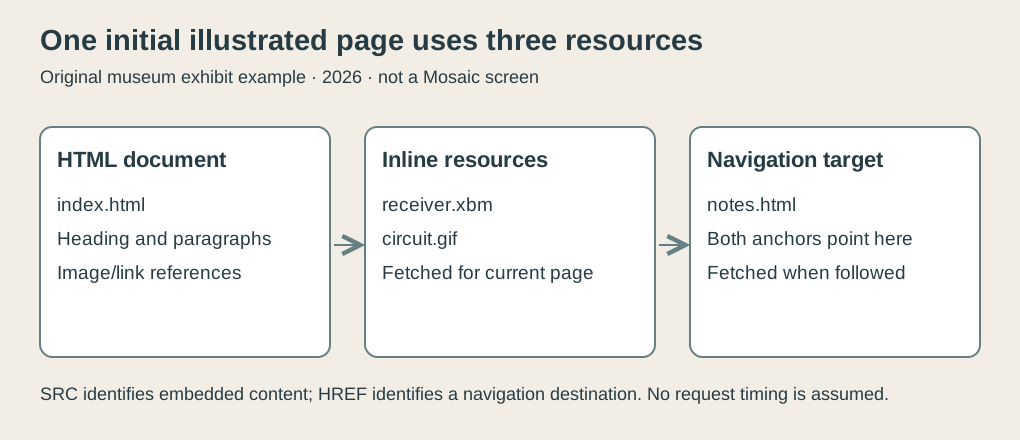
Original explanatory diagram, 2026. The invented museum page initially references two images; construction notes are fetched on navigation in this model. This does not assert Mosaic’s exact request scheduling or caching behavior.
The pictures have their own journey
The separation between document and images creates useful flexibility. An author can change the receiver drawing without rewriting the surrounding explanation. A second document can reference the same illustration. The resources can also reside at different network locations if the addresses say so.
It creates additional ways for the page to be incomplete. The HTML can arrive while an image is unavailable. The file can exist while its format is unsupported. A reference can point to a misspelled name. The text alone cannot repair those conditions.
Consider three outcomes for the first image: it arrives and decodes, it fails to arrive, or it arrives in a format this browser can’t interpret. Those outcomes are different from whether the HTML was retrieved successfully.
A placeholder communicates that the browser could not produce the requested image. It should not be read as proof that the entire page is missing. Equally, successfully displaying the heading does not establish that the illustration has been obtained.
The April 1.0 changelog is revealing because it concerns precisely this ordinary work: making GIF reading more robust, fixing an image-tag parsing loop, and adjusting unreadable-image handling. Those improvements make sense when an image is a separately processed participant in a document, rather than decoration magically contained in the page name.
They also show why browser history needs implementation detail. The appealing headline is pictures beside words. The working product includes what happens when the picture fails.
An illustrated page also has a payload
Now give the invented resources sizes: 6 KiB for the HTML, 20 KiB for the receiver illustration and 12 KiB for the circuit image. Here KiB means 1,024 bytes.
The total initial payload is 38 KiB, or 38,912 bytes. At an assumed ideal throughput of 14,400 bits per second, the payload alone would require:
That is a model calculation, not a Mosaic benchmark, a guarantee about a modem, or a measured 1993 network connection. It excludes connection delays, protocol overhead and compression. We choose the rate only to make the cost of additional resources concrete.
At the same assumed rate, the HTML alone accounts for about 3.41 seconds. Adding the images changes the reader’s experience and the amount of material that must cross the network.
The arithmetic explains a tradeoff that doesn’t depend on claiming a particular request sequence. Pictures can carry explanatory value while also costing bandwidth. A small useful diagram may justify its cost; an unnecessarily large decorative image may not.
Our example also shows why the notes link doesn’t add its payload to the initial sum. Its destination matters when navigation happens. A file can be referenced by a page without being an embedded resource required to assemble that page.
The checker verifies the byte total and ideal timing. It doesn’t model caching, parallel transfers, progressive display or the browser’s exact treatment of every failure. Those would require further implementation evidence.
The interface helped the reader keep their place
Pictures attract attention, but navigation requires memory. A person needs to return to a previous document, preserve useful destinations, and understand where the current one came from.
The January announcement’s history lists, multiple windows and persistent hotlist addressed these practical tasks. A history describes a browsing path. A hotlist preserves places the person intentionally wants to revisit. Those are related conveniences serving different purposes.
In the invented exhibit, the reader can move from the radio introduction to construction notes and then back. Saving a useful destination has a different meaning from retracing the route used to find it.
Mosaic’s success is easier to interpret when these ordinary operations accompany the pictures. NCSA’s retrospective emphasizes installation and feedback, identifying the work of Bina and Andreessen.4 Its broad claims about the first inline-image browser are not needed to explain the product’s contribution.
The combination reduced friction around a network document: obtain it, understand it, follow something, return, and retain a useful location. Each step is modest. Together they make browsing something a person can keep doing.
A page was assembled, not simply opened
Mosaic’s 1993 development joined an evolving document language to an increasingly practical browser. The dated messages make that evolution visible rather than compressing the year into one mythical launch.
January offered an early X browser. February described working inline-image machinery and proposed markup. April delivered X 1.0 with fixes to the ways real resources could misbehave. Other platforms widened the audience later.
The illustrated page was the result of several agreements: an author supplied references, the browser obtained and interpreted resources, and navigation gave the reader ways to move between documents.
That arrangement made the web useful as a place for explanation as well as retrieval. The reader saw a receiver beside its description. Underneath, the browser had assembled a small networked publication, one resource at a time.
Footnotes
-
Marc Andreessen, NCSA X Mosaic 0.5 released, January 23, 1993. Complete contemporary message read from downloaded mirror; current/future lists distinguished. ↩
-
Marc Andreessen, Proposed new tag: IMG, February 25, 1993. Complete proposal read; image-in-anchor and browser-format discretion inspected. ↩ ↩2
-
Marc Andreessen and Eric Bina, NCSA Mosaic 1.0 released, April 21, 1993. X release and actual image/portability changelog read. ↩
-
NCSA, Mosaic project retrospective, installation, contributor and feedback discussion. Retrospective image-priority claim and inconsistent screenshot dates not adopted. ↩