C:\2000S\GIT.TXT
2005
Git: History Becomes a Graph You Can Carry
Git's 2005 object model connected identifiable snapshots into histories that developers could branch, inspect and combine locally.
A project directory tells you what the files contain now. It doesn’t explain which experiment produced them, which change belongs to a bug fix, or how two developers’ work should be combined. Copying the directory into folders named final and final-really records effort without reliably recording history.
Git began in 2005 amid the Linux kernel community’s need for a replacement after its relationship with BitKeeper broke down. The project’s published history credits Linus Torvalds and identifies distributed operation and nonlinear development among the early goals.1
The interesting object was a history developers could hold locally. They could record work and inspect its ancestry without making each operation a conversation with one central server.
That changed the relationship between making a change and offering it to somebody else. A developer could accumulate a coherent series of local records first. The question of which work should enter the shared project remained a separate human and technical decision.
Files, arrangements and history are different objects
The README preserved at Git v0.99 describes four object types: blobs, trees, commits and tags. Blobs hold content; trees arrange content under names; commits connect a tree to its history.2
This separation is useful. Two filenames can refer to the same content without requiring two independently described copies of that content. A name belongs to the arrangement, rather than to the raw file bytes alone.
The early documentation describes content-based identity using SHA-1. That is period evidence, not a present-day claim that SHA-1 supplies every security guarantee one might want. More basically, identifying bytes doesn’t establish that those bytes are a good program.
Imagine two files whose contents both read count=1. Under the model, their shared contents can use the same blob while the tree records two names. Rename one file without changing its bytes, and the name arrangement changes even though its content does not.
A commit adds another distinction. It can record an arrangement identical to another commit while carrying a different parent or explanatory message. File equality and historical identity therefore answer different questions.
The v0.99 README explicitly warns that well-defined commit contents don’t prove that the result or its stated history makes sense.2 This is a refreshingly direct limit. A content tracker can’t assume responsibility for the reasoning inside the tracked content.
Make two changes from one starting point
Here’s an original worked example using two tiny invented configuration files. The initial commit, which we’ll call A, contains:
label.txt: colour=blue
count.txt: count=1
Create a branch named colour from A. Change the label to green and record commit B. Return to the original line of work, named main in our demonstration, and change the count to 2, recording C.
The history now forks. B and C both have A as their parent. Neither contains the other’s change. B has green and count 1; C has blue and count 2.
The letters are explanatory labels, not real object identifiers. The executable check creates actual commits in a disposable directory and obtains their identities from Git. It uses Git 2.55.0 on Linux, rather than pretending to run a 2005 binary.
Our modern commands include initialization options chosen for a clear demonstration. They aren’t a period command transcript. The historical source establishes the early graph/object model; the execution verifies this example in its stated environment.
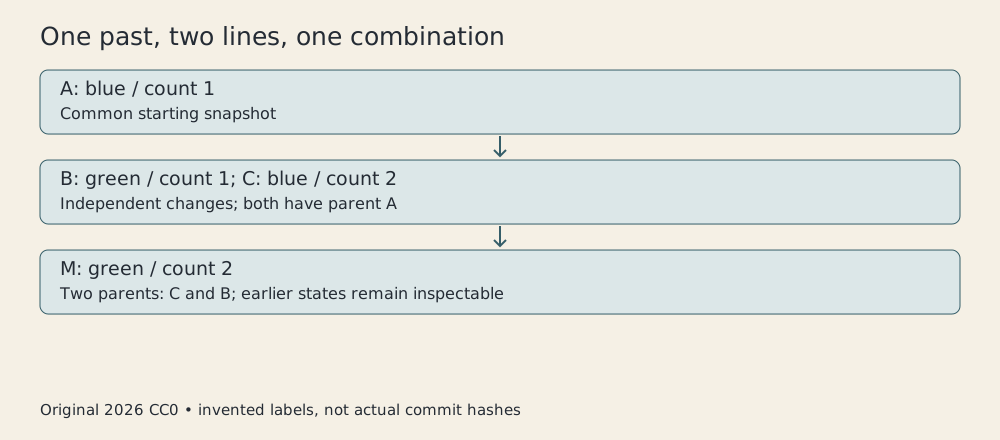
Original CC0 diagram, 2026. Invented A/B/C/M history; descriptive labels rather than actual commit hashes.
A branch provides a name for a line of work. In the demonstration, creating that name doesn’t copy a complete working directory into another project folder. Checking it out changes which recorded state the working files represent.
This makes a task interruption more manageable. The developer can give unfinished work a recorded place and move to another line. Uncommitted changes require additional care, because a working directory is not automatically a saved commit merely because it lives inside a repository.
Three states explain one merge
Combine the colour branch into main. Our common base A says blue and count 1. B changes only the colour. C changes only the count.
The merge can compare both later states with the base. The colour changed on one side and stayed unchanged on the other. The count changed on the other side and stayed unchanged on the first. The combined result is green and count 2.
Our check confirms those exact file contents. It also examines the resulting merge commit M and confirms two parents, C and B. The record expresses that the new state combines those lines of work.
Modern Git documentation explains three-way merging through the two branch tips and their common ancestor.3 We use that explanation for the conceptual operation, without assigning today’s complete merge strategy to v0.99.
The common base is important because comparing only B and C tells you that both fields differ, but not which side changed each field. A provides the prior state against which each difference acquires meaning.
Merging isn’t simply choosing the newer file. “Newer” is inadequate when both versions contain different useful work. Wall-clock timestamps don’t express the relationship between the changes as clearly as their ancestry does.
The graph also preserves the earlier states for inspection. M doesn’t need to erase B and C to represent a combined result. Integration adds a relationship rather than requiring the historical fork to disappear.
A conflict asks for a decision
Now start two fresh branches from A. One changes the same label line to red. The other changes it to yellow. Neither change can be included as the sole value of that line while retaining the other unchanged.
Our modern Git check reports a conflict and inserts conflict markers. It doesn’t silently select a colour. The absence of an automatic result is useful information about the operation’s limits.
A developer might decide red is correct, yellow is correct, or that the configuration needs an entirely different arrangement. That decision requires knowledge beyond the fact that both edits exist.
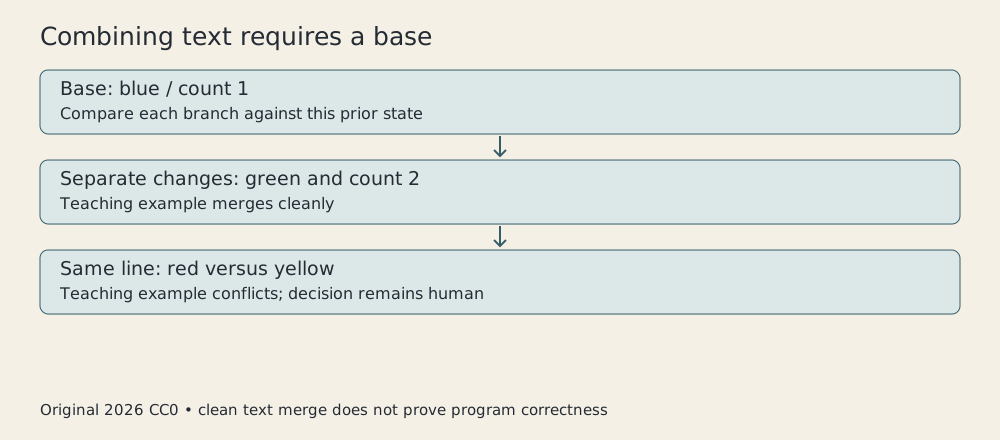
Original CC0 illustration, 2026. Invented configuration changes, not a guarantee about all textual merges.
Removing markers and recording a resolution isn’t proof that the chosen result works. The application may interpret the merged files in ways the merge tool doesn’t understand. Validation needs to address those semantics.
Even a clean merge can be wrong. Two edits to separate files may introduce incompatible assumptions while posing no textual conflict. The successful green/count-2 example verifies its intended text result, rather than establishing a general theorem about program correctness.
This division of responsibility is worth keeping visible. Git can preserve and compare recorded states. Developers still have to decide whether the combined state is appropriate and test behavior that matters.
Staging makes a record deliberate
The early README describes the index as a representation used to construct trees.2 This introduces a useful intermediate state between the files currently being edited and the next historical record.
Suppose the working directory contains a finished bug fix and an unrelated experiment. Recording both together would make later review harder. A deliberate staging step can select what belongs in the next commit.
The selection needs checking. A developer might stage one version of a file, continue editing it and forget that the next commit represents the staged version. The working directory and the pending record can differ.
That isn’t inherently a defect. It is what makes selective recording possible. It does mean that “I looked at the file” and “I reviewed the contents being committed” are not always the same statement.
A small, coherent record helps future readers ask a precise question: what did this change intend to accomplish? A message can describe that intention, while the actual recorded difference lets the reader assess it.
The mechanism doesn’t force good commit structure. It supplies the means to create one. A history consisting of giant unexplained snapshots remains difficult to understand even if every object is impeccably identified.
Distributed storage doesn’t abolish coordination
Holding history locally makes many operations independent of network availability. It also means different repositories can contain different knowledge of the project until they exchange it.
A developer’s local branch advancing doesn’t automatically update every colleague’s branch. Sharing transfers information; accepting that information into a particular line of work is another operation.
This is a strength when work needs review before integration. It can also be confusing when people mistake their local view for the whole team’s current state. A distributed system still needs conventions about where accepted work is collected.
The software doesn’t decide who is entitled to approve a change. A team can choose a central integration repository, maintain several authoritative lines, or organize contribution in other ways. Technical distribution and organizational authority are distinct.
Nor is a repository automatically a backup of everything needed to reproduce the software. Untracked inputs, external services and build dependencies can remain outside it. Preserving source history is substantial, but the surrounding environment needs its own account.
Keep the early tool separate from its later surroundings
Git’s creation predates many interfaces and hosting habits now associated with it. This article doesn’t turn a 2005 repository into a modern pull-request service or assign every present command option to the first release.
The early README was actually read in its selected version, alongside modern project documentation. The practical example ran locally, used an invented identity and contacted no remote service. Its temporary repository was removed after verification.
The consequential idea remains clear: content can be identified, arrangements can be recorded and changes can have more than one line of ancestry. A merge can describe how those lines meet while leaving the common past available.
That makes history more useful than a pile of increasingly hopeful directory names. You can ask which work a result contains, where the lines diverged and what decision joined them. The graph won’t answer whether the decision was wise, but it gives the next person a much better place to begin.
Sources
Footnotes
-
Git project, A Short History of Git, Pro Git, current retrospective. 2005 origin, Torvalds and stated goals; no contemporary benchmark claimed. ↩
-
Git project, README at v0.99, preserved 2005 version. Selected object, trust and index sections read, with early terminology kept separate from current commands. ↩ ↩2 ↩3
-
Git project, Basic Branching and Merging, current Pro Git. General ancestry/three-way/conflict explanation; not an exact early merge implementation. ↩