C:\2010S\DOCKER.TXT
2013
Docker: Package the Application's Assumptions
Docker's 2013 releases made Linux containers useful as layered application packages, without making the surrounding machine disappear.
A program can be copied successfully and still fail immediately. Its executable arrived. The library it expects, the interpreter it needs, and the configuration implied by last week’s installation instructions may have taken a different route.
Docker made that surrounding filesystem part of the thing developers could package and distribute. Its initial public release, version 0.1.0, is dated March 23, 2013 in the project’s release history. This article follows the early year’s development through 0.6.5, rather than attributing every later Docker feature to the first release.1
The useful shift was from handing somebody an application and a set of assumptions toward handing them an application environment with more of those assumptions made concrete. Linux container mechanisms supplied isolation. Layered images and developer-facing tools made that isolation into something people could build, name, move, and run.
That didn’t remove the host computer. It made a particular boundary easier to manage.
Build on a kernel instead of shipping another one
The 0.6.5 README describes Docker as an application-oriented container engine built on Linux namespaces, cgroups, AUFS, and LXC tooling. It connects the project to dotCloud’s deployment engine and lists both long-running services and short-lived commands among its uses.2
Docker therefore belongs to a longer history of process isolation and operating-system containers. It wasn’t the invention of grouping processes, separating views of resources, or limiting resource consumption.
A container uses the host kernel rather than booting a wholly independent guest kernel for each application. That can avoid some machinery associated with a virtual machine, but it also gives portability a condition: the host must support the environment the program expects.
The period installation instructions are admirably specific about that condition. They call for suitable Linux and AUFS support, discuss kernel 3.8, and identify supported Ubuntu installation paths.3
Those requirements put a useful boundary around the README’s broad portability rhetoric. The same package wasn’t a magical replacement for operating-system compatibility. On other desktop operating systems, the early README described using a virtual machine to provide the Linux setting.2
A layer containing the right libraries can’t supply a kernel feature that the host lacks. It has put the luggage in order; it hasn’t changed the railway.
A build is a succession of filesystem decisions
Docker’s early build model describes ordered commands whose results become the starting point for subsequent commands. The project’s release history documents layer-by-layer docker build and Dockerfile work during the early 2013 releases.21
Imagine an original packaging exercise for a small report generator. Begin with a base environment. Add a runtime. Add the application. Set its normal startup command.
The application depends on the runtime, and the runtime depends on the base. The order describes a relationship, rather than merely a pleasing arrangement of installation instructions.
Each step can also leave unnecessary material behind. A downloaded archive used to install the runtime might not be needed when the application runs. An overly broad input directory might include files that belong to development rather than deployment.
The build author therefore decides what the application environment should contain. Docker provides a mechanism for assembling it; it doesn’t know which of the developer’s files are deliberate.
This distinction is important because repeatable packaging can repeat mistakes very efficiently. A missing dependency can become a consistent failure. An accidental file can become a consistently distributed accident.
Layers explain both reuse and change
The version 0.6.5 image documentation describes read-only images with parent relationships and a writable layer above them. Changes made by running processes go into that writable layer while the underlying image remains unchanged.4
For a teaching model, let a base layer contain three fictional paths:
/runtime          version R1
/app/report       version A1
/etc/report.conf  mode=summary
Start two containers from that image. The first changes /etc/report.conf to mode=detail. The second creates /tmp/result.txt. Each gets its own writable changes.
Reading the configuration in the first container finds its changed value. Reading it in the second finds the base value. The first container’s edit doesn’t rewrite the shared read-only image.
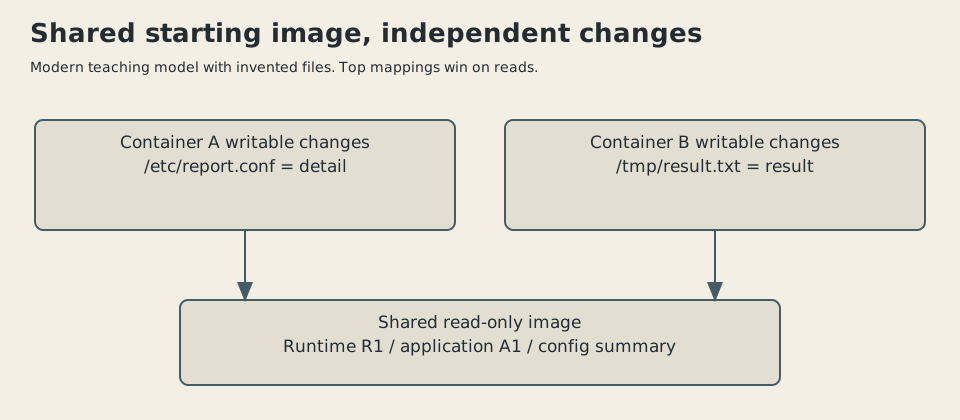
Original conceptual illustration, 2026. Fictional paths and values explain layered lookup. Not an exact AUFS implementation diagram or historical Docker screenshot.
A simple Python dictionary model checks these lookups. It searches the writable mapping first, then the base mapping. It isn’t a filesystem driver: it has no permissions, metadata, directories, mounts, or deletion markers.
Those omissions matter. A real layered filesystem must decide how to represent a file hidden by an upper layer, how to copy material before modifying it, and how to present coherent metadata. Our model isolates the read precedence, which is enough to explain why the shared base needn’t change.
It also separates two kinds of state. The image describes a starting environment. The running container accumulates changes. Recreating a container from the starting image isn’t the same as restoring everything the old process wrote.
Put a size on sharing
Invent a common base-and-runtime set totaling 125 megabytes. Application A adds 30 MB; application B adds 40 MB. Assume these are stored sizes in one consistent unit and ignore metadata and compression.
Two separate complete copies require:
A shared common set plus the two additions requires:
The difference is 125 MB. The example demonstrates a reuse opportunity, not a measured Docker image size or download saving.
| Invented storage arrangement | Total |
|---|---|
| Separate complete packages | 320 MB |
| Shared common set and two additions | 195 MB |
| Difference | 125 MB |
Actual transfer depends on what the recipient already has and which layers are shared. Two systems with different caches can download different amounts for the same application update.
The layered model also makes ordering consequential for reuse. A frequently changed application layer placed after a stable runtime can leave that earlier material reusable. If the frequent change occurs before expensive installation work, more subsequent results may have to be rebuilt.
That is a general dependency observation, rather than a benchmark of the 2013 cache. It explains why a build’s order affects more than correctness. It can affect the amount of work repeated after an edit.
A saved package and a repeatable recipe are different things
Our report generator might fetch a package by a floating name during its build. Today that name resolves to runtime R1; later it resolves to R2. The instructions haven’t changed, but the resulting filesystem can.
Preserving an already-built image captures a particular result. Rebuilding from instructions also depends on the inputs those instructions obtain. Network services, package repositories, base tags, and downloaded files can all change.
This doesn’t invalidate the build model. It identifies what must be specified if reproducing the same result matters. A recipe is more dependable when its inputs have definite identities and remain available.
The distinction is especially useful in historical writing. Running a modern Dockerfile successfully wouldn’t prove that the same instructions, repositories, or package versions worked in 2013. No period Docker installation was run for the examples in this article.
The checked models demonstrate layer precedence and arithmetic. The historical claims come from the versioned documentation and release material.
Networking has another boundary
By 0.6.5, Docker’s announcement included memorable container names, links, host-supervisor integration, and more explicit port publishing. It distinguished an exposed container port from publishing a port on host interfaces.5
Imagine our report service listening on port 8080 inside its container. A host-side port 9000 can forward traffic to it. The application’s listening port and the host’s reachable port are related, but they are different addresses in different contexts.
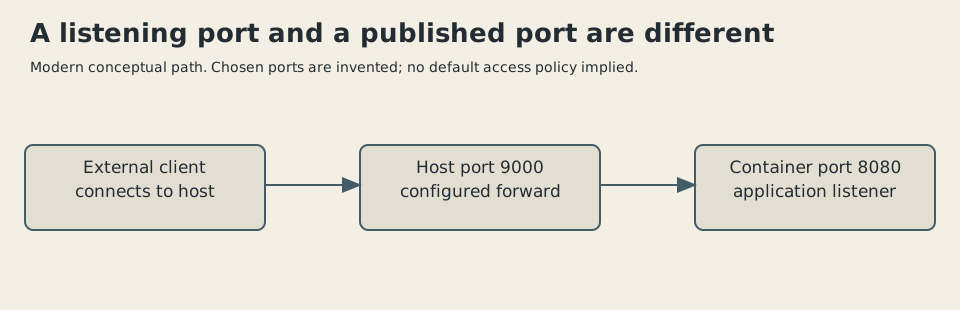
Original illustration, 2026. Invented host port 9000 and container port 8080. No claim about a default interface, firewall, or measured reachability.
That difference gives an operator a place to choose how the service is reached without rewriting the application merely to change a host-side number. It also means an image describing a listening service doesn’t automatically establish that the service is reachable from elsewhere.
The October announcement is dated October 31; the preserved release notes date 0.6.5 to October 29. Those are separate publication records. Neither needs to be erased to give the product one tidier birthday.51
This release also still depended on LXC. Modern examples using subsequent networking and runtime systems belong to later history, even when they use familiar Docker commands.
Packaging isn’t orchestration
A container engine can start an application with a defined filesystem and configured surroundings. A complete service still needs persistent data, secrets, restart policy, availability planning, and relationships with other services.
Our report generator’s image doesn’t contain the decision about which customer database it should use. Nor does a successful start prove that the database is ready, the disk has room, or the generated report is correct.
Docker made one important part of deployment more concrete: the application’s user-space environment could be assembled and moved as a named artifact. That gave developers and operators a better object to discuss than a machine that had gradually acquired the right installations by custom and memory.
It didn’t make every operational problem an image problem. The boundary’s usefulness depends on knowing which assumptions it captures and which remain outside.
The 2013 milestone deserves that narrower admiration. Existing Linux isolation became a practical packaging workflow, and layers connected filesystem construction to reuse. A program’s surroundings were no longer quite so easy to leave undocumented on the machine where it happened to work.
The application could travel with more of its luggage. Somebody still had to check that it had arrived at the right station.
Sources
Footnotes
-
Docker, “Engine prior releases”, inspected 0.1.0, early builder entries, and 0.6.5 chronology. Initial public release March 23, 2013; 0.6.5 record October 29, separate from announcement. ↩ ↩2 ↩3
-
Docker repository, README at tag v0.6.5. Raw version successfully retrieved and read. dotCloud lineage, Linux components, command-based builds, and non-Linux VM boundary; marketing claims of zero overhead aren’t adopted. ↩ ↩2 ↩3
-
Docker repository, Ubuntu installation documentation at v0.6.5. Read requirements; obsolete commands aren’t presented as current installation advice. ↩
-
Docker repository, image terminology at v0.6.5. Read-only image/parent and writable-layer model. Python example is original, not copied filesystem code. ↩
-
Michael Crosby, Docker, “Docker 0.6.5: name your containers, link them together…”, October 31, 2013. Names, links, supervisors, port-publishing changes, and continuing LXC dependency. ↩ ↩2