C:\2010S\BLENDER2.TXT
2019
Blender 2.80: Organize the Scene, Then Choose How to See It
Blender 2.80 paired a revised creative interface with new scene organization and real-time rendering, changing both how artists worked and how a scene could be presented.
A 3D scene can become difficult to manage well before it becomes difficult to render. The artist wants to adjust a spoon. The scene also contains a cup, several lights, a backdrop and enough surrounding machinery to make selecting the spoon feel like an administrative task.
A finished image hides that machinery. The person making the image has to live with it.
Blender 2.80 addressed the working environment as well as the output. Its redesigned interface, scene organization and rendering options made the relationship between the stored scene and the artist’s current task more explicit. The release was interesting because these changes belonged together: organize the objects, choose the working view, and decide how to evaluate what the scene looks like.
A long project became a release
Ton Roosendaal’s announcement records Blender 2.80’s release on July 30, 2019, after years of work. The public release should be distinguished from the earlier development effort and previews.1
The official feature record identifies default left-click selection, refreshed tools, workspaces, a new Workbench engine for viewport tasks, Eevee real-time rendering, integrated Grease Pencil 2D animation, Collections and View Layers.2
Eevee could produce final frames as well as drive a real-time viewport. It shared shader-node materials with Cycles, which remained available. Sharing material descriptions did not mean that both engines used the same rendering method or produced identical images.
The changes also had costs. The release broke Python API compatibility, requiring scripts and add-ons to adapt. Blender Internal and the Blender Game Engine were removed. A substantial redesign can simplify future work while making somebody’s existing workflow require repairs.
This was a community effort, rather than a new product made by one person. The release record credits developers, artists, documentation work and organized support. The design changes make most sense as a reworking of a substantial existing creative system.
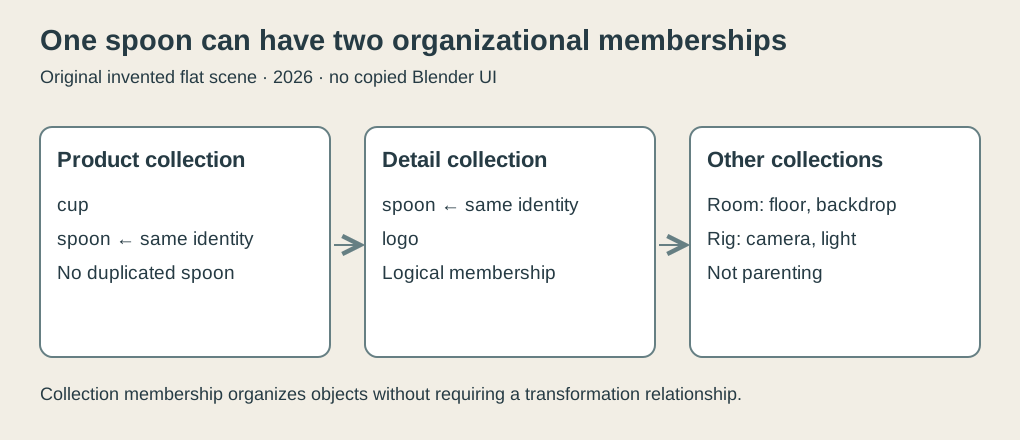
Original explanatory diagram, 2026. An invented scene links one spoon object to two collections. It is not a Blender screenshot, a parent hierarchy or duplicated geometry.
Grouping does not have to move anything
The version-specific manual describes Collections as logical organization and distinguishes them from parenting. An object can belong to more than one collection.3
That distinction is useful. Parenting establishes a relationship that can affect transformations. Logical membership can answer a different question: which objects belong to this task or this presentation of the scene?
Consider an invented tabletop product scene. We give its objects stable identities and arrange four flat collections:
| Collection | Members |
|---|---|
| Room | Floor, backdrop |
| Product | Cup, spoon |
| Detail | Spoon, logo |
| Rig | Camera, light |
The spoon belongs to both Product and Detail. There is still one spoon object. We have two organizational references to it, not two copies that need their edits kept synchronized.
The camera and light belong to Rig so the example can keep the rendering equipment separate from the visible subject. These names describe our scene, not a prescribed Blender template.
The flat arrangement is deliberate. It avoids nested collection exclusions, instancing and other visibility flags so we can inspect the central membership rule without pretending to cover every scene configuration.
One scene, two sets of participation
Suppose we want a product view containing the room, cup and spoon, plus the camera and light. We include Room, Product and Rig. Detail is excluded from this view.
The participants are the union of the included collections:
floor, backdrop, cup, spoon, camera, lightNow make a detail view by including Detail and Rig while excluding Room and Product. Its participants are:
spoon, logo, camera, lightThe version 2.80 View Layers manual describes excluding a collection and specifically notes that objects only in that collection won’t be rendered for that layer.4 That qualification matters to our spoon.
Excluding Detail from the product view does not remove the spoon’s membership in the included Product collection. Likewise, excluding Product from the detail view leaves the spoon available through Detail.
A naive mental model would subtract every object in an excluded collection from the scene. In our case that would make the spoon disappear from the product view simply because it also belongs to Detail. The included membership provides another route.
Our original checker models this as sets. It forms the union of included flat collections, checks the six product participants and four detail participants, and confirms that the spoon belongs to both results. It also demonstrates why globally subtracting Detail gives the wrong result for this example.
These checks run in modern Python and do not invoke Blender. They establish the arithmetic of the stated teaching model, whose central membership distinction is supported by the actual 2.80 manual. They do not cover all combinations of Blender’s visibility settings.
Edit the object once
Now increase the spoon’s modeled height from 1.0 to 1.25 units. Because both views refer to the same object identity, each obtains the new value when it accesses that object.
If we had duplicated the spoon into separate product and detail scenes, the copies could drift. One could have the revised handle while the other retained the old one. The artist would need a separate synchronization practice to keep them consistent.
Shared membership avoids that particular duplication. It does not force both views to look identical. They have different other participants, and a real project can supply different rendering and compositing choices.
This is a useful separation between the scene’s data and its presentations. The stored spoon can be common while the surrounding work is selected for a particular purpose.
The detail view in this example is not a promise of a complete product photograph. It excludes the cup and room, so those objects do not participate through the omitted collections. If the intended result needs their shadows or reflections, our simple include/exclude arrangement is insufficient. The artist must define that requirement using the appropriate rendering controls.
A view configuration is therefore part of the image’s meaning. Turning something off can affect more than whether its outline appears directly in the camera.
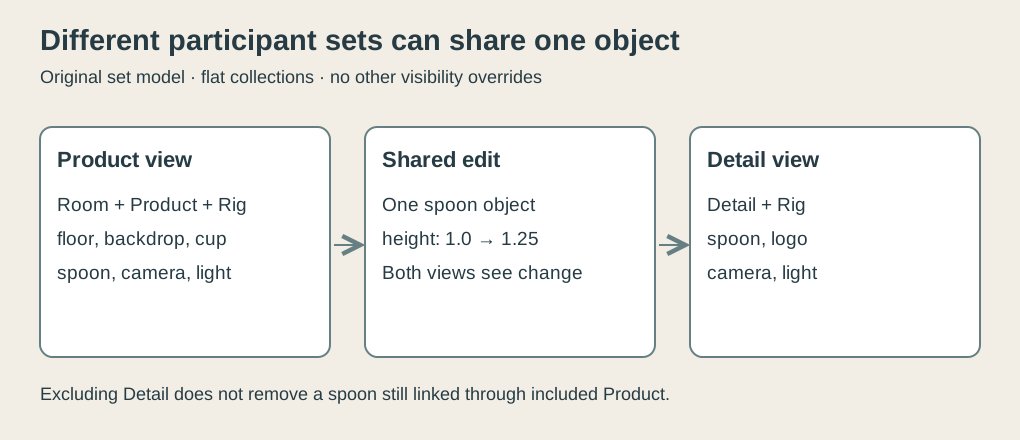
Original explanatory diagram, 2026. The invented flat collections yield two participant sets and share one spoon identity. Other visibility, hierarchy and render-influence settings are outside this model.
A working image can answer a different question
Once the scene is organized, the artist still needs to see it. Blender 2.80 provided different machinery for different viewing purposes.
Workbench served tasks such as modeling and scene layout. Eevee offered real-time shaded rendering. Cycles remained a separate rendering option. A useful working view is the one that helps answer the current question: does the silhouette work, is the material plausible, or does the intended lighting produce the desired image?
An interface can make changing those questions easier. It cannot make the underlying rendering methods equivalent.
The 2.80 Eevee manual describes screen-space effects using the depth buffer as an approximation of the scene. Such effects have information about the visible view and the front-most depth, with limitations at screen edges and for hidden information.5
An invented single-pixel example makes that information limit concrete. Suppose a visible surface lies at depth 3 and another surface lies behind it at depth 8. A front-most depth value records 3. It does not also contain the hidden 8.
If two scenes differ only in what is behind that front surface, they can provide the same value to this particular depth representation. A calculation using only that value cannot distinguish the hidden alternatives. More computation on the same input cannot manufacture absent information.
This is an explanation of one approximation’s limits, not a complete Eevee algorithm. Other scene information and rendering techniques can contribute to the final image. The point is to understand why a fast working result may change when an object enters the view or when a different rendering method is chosen.
Fast feedback has an editorial consequence
Quick feedback changes how an artist can work. Move a light, inspect the result, revise its placement, and compare again. The interaction becomes a sequence of informed adjustments rather than a long wait followed by a guess about which earlier decision caused the problem.
That benefit does not require every working image to be final-quality or every renderer to produce the same result. It requires the artist to understand what the current image is useful evidence for.
In the invented scene, a viewport may make the spoon’s silhouette easy to judge. A shaded preview may help choose the cup’s material. A final rendering decision may involve different priorities. Organizing the same scene to support those tasks is more valuable than demanding that one display mode serve them all.
The revised workspaces and viewport controls belong to this larger story. They organize access to tasks, while the scene model organizes access to objects. Neither is merely decoration around an unchanged creative process.
The redesign preserved work by changing its structure
Blender 2.80 did not begin Blender’s history. It made a consequential change to the environment in which existing and new Blender work could be done.
Its combination of scene organization and viewing options is easier to appreciate through a modest case than through a feature list alone. One spoon can belong to two useful groups. Two views can refer to the same object without including the same surroundings. A rendering representation can be fast while retaining clear limits on the information it uses.
The practical achievement was giving artists more explicit control over those relationships. There was still a scene to understand, an image to judge and compatibility work for an existing pipeline.
But the artist no longer had to treat every task as the same view of the same undifferentiated pile of objects. That is a substantial improvement for software whose finished output usually conceals how much organization was required to make it.
Footnotes
-
Ton Roosendaal, Blender 2.80 released, July 30, 2019. Actual announcement body read from downloaded HTML. ↩
-
Blender, 2.80 feature and compatibility record, interface, engines, animation, organization and removed-feature passages inspected. ↩
-
Blender 2.80 Manual, Collections, logical grouping, linking and multiple-membership passages. ↩
-
Blender 2.80 Manual, View Layers, usage and collection inclusion/exclusion passages. Model deliberately assumes flat collections and no other visibility overrides. ↩
-
Blender 2.80 Manual, Eevee limitations, screen-space effects and depth-buffer limitations. The depth-3/depth-8 example is original. ↩