C:\2010S\FIGMA.TXT
2016
Figma: The File Stopped Taking Turns
Figma's 2016 public release made simultaneous design work a property of the shared document, with conflict rules that still needed careful definition.
A design file called final-final-revised is a small administrative confession. The team has a document, several competing descendants, and a naming scheme doing work that ought to belong to the software.
Sending a copy is easy. Knowing which copy contains the latest button position, revised wording and approved color is harder. Two people can each make sensible changes and still produce an awkward negotiation over whose file should survive.
Figma’s 2016 public release addressed that negotiation inside the design tool. People could work in the same browser document simultaneously. The file no longer needed to pass from one person to another before useful work could continue.
That sounds like a feature for meetings. Its more interesting consequence is architectural: the document has to represent changes small enough to combine, and conflicts precise enough to resolve.
Preview was not yet multiplayer
Dylan Field’s December 3, 2015 announcement introduced a preview of Figma, a browser-based vector interface design tool developed with co-founder Evan Wallace. Link sharing, contextual feedback and shared colors were described then. Simultaneous multiplayer editing appeared among the plans for 2016.1
That distinction prevents an attractive feature from arriving a year early in the history. Collaboration can mean reviewing the same design, sharing access, or editing simultaneously. Those capabilities are related without being identical.
Wallace’s public-release announcement is currently dated September 28, 2016. It opened signup to anyone and introduced multiplayer. Figma’s later retrospective places its official birthday at the end of September; this account retains that late-September boundary rather than resolving competing dates by assertion.23
The release account describes server-broadcast changes, independent properties and a latest-change conflict rule. It also discusses undo and coupled properties. Cursors, selections and viewer/editor permissions gave the shared state a usable interface.2
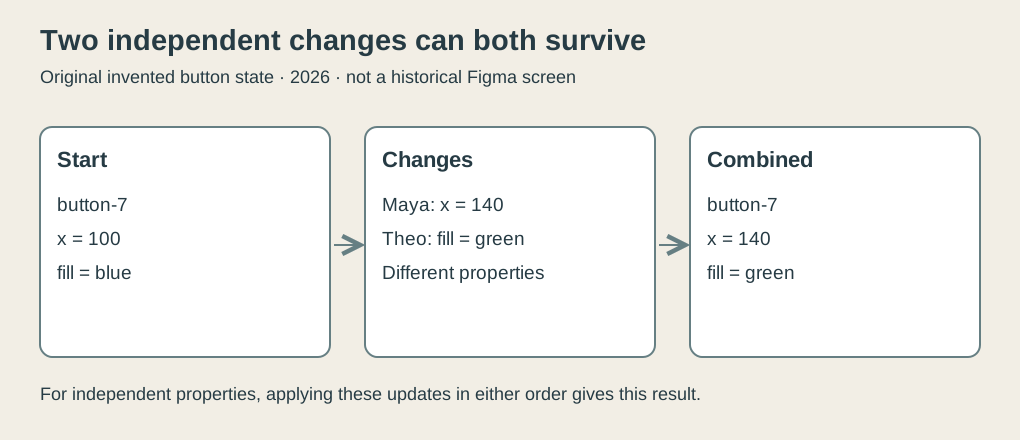
Original explanatory diagram, 2026. The invented button has independent position and fill properties. The drawing is a teaching model, not a Figma screenshot or its actual wire format.
A button is more than one indivisible picture
Consider a deliberately small invented document with one button, identified as button-7. Its state is:
object: button-7
x: 100
y: 80
fill: blue
text: Continue
Maya wants the button farther right. Theo wants a green fill. Both begin from the state above.
If each saves an entire replacement document, Maya’s copy contains x = 140 and a blue fill. Theo’s contains x = 100 and a green fill. Whichever complete copy replaces the other can discard one useful change.
Version history may preserve the discarded work. That helps recovery, but still leaves someone to notice the loss and reconstruct the intended combination. The existence of an old version is not the same as a correct current document.
Instead, describe Maya’s operation as “set button-7.x to 140” and Theo’s as “set button-7.fill to green.” Applying both operations produces a button at 140 with a green fill.
The outcome is the same in either order. Position and color occupy different properties. Neither operation needs to replace the other property with the old value that happened to be visible when the person started.
| Operation | Position afterward | Fill afterward |
|---|---|---|
| Starting state | 100 | Blue |
| Maya moves the button | 140 | Blue |
| Theo changes its fill | 140 | Green |
This example follows the property independence described in the 2016 announcement. The names, values and operations are original. The simplicity comes from choosing a case where the changes really are independent.
One property cannot be two values at once
Now both people move the same button. Maya chooses x = 140; Theo chooses x = 180. A single button has one horizontal position in the final shared state.
For conflicting updates, the launch account says the latest change wins. It does not specify a client-clock rule.2
For our teaching model, we explicitly assign the server an ordered sequence of accepted operations. Maya’s update is accepted first, Theo’s second. The model finishes at 180. Reverse that accepted order and it finishes at 140.
This produces agreement, but agreement is narrower than design consensus. All participants can see the same button position without agreeing that it is the better position. Synchronization resolves the state. A conversation resolves the intention.
Averaging the positions would be another possible policy, producing 160. It would also choose a position neither designer requested. That may be appropriate for some collaborative task, but it is not the latest-change rule we are illustrating.
The modest virtue of the rule is predictability. Once an authoritative order is known, everyone can obtain the same result by applying it. The tradeoff is that one conflicting choice supersedes the other.
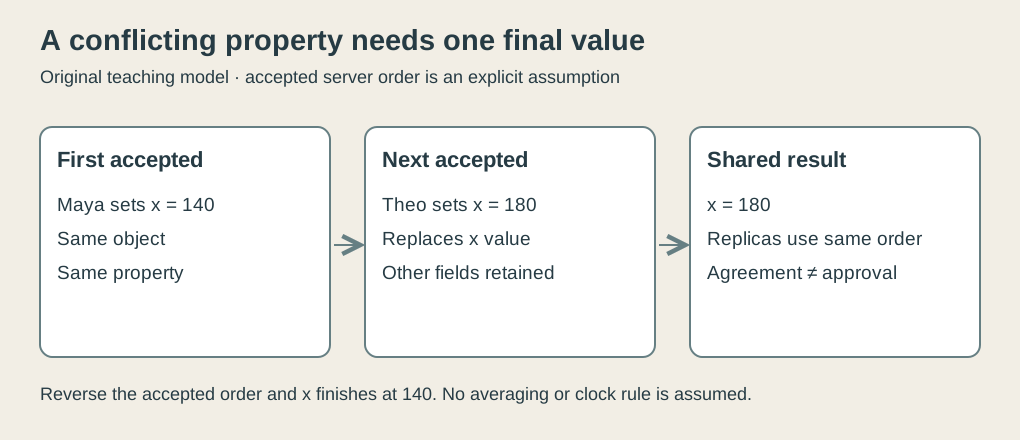
Original explanatory diagram, 2026. Server order is an explicit assumption of this teaching model. The 2019 technical account confirms server ordering in the later documented system; no 2016 timestamp scheme is inferred.
The screen can lead the shared record
A designer reasonably expects a drag to move a shape immediately. Waiting for a round trip through the server before every visible response would make the shape feel attached to a very long string.
A client can show its own change locally while sending that change for distribution. Other clients may temporarily display different states because messages take time to arrive. The useful requirement is that they reach agreement once the accepted changes have been delivered.
Our model illustrates this without simulating Figma’s networking. Maya first sees 140 locally. Theo first sees 180 locally. When both receive the model server’s ordered sequence, Maya’s 140 followed by Theo’s 180, both finish at 180.
Merely applying messages in each client’s accidental arrival order would not be enough for this simple model. If one client applied Theo then Maya while another applied Maya then Theo, their final positions would differ. A system needs a consistent conflict rule, not just a rapid method of sending messages.
The accompanying checker applies independent changes in both orders and gets the same combined result. It applies competing position changes in both orders and gets different results. Finally, it has two replicas apply the same server-ordered sequence and checks agreement. This is a modern executable illustration of the assumptions above, not a test of the original Figma service.
Wallace’s October 2019 technical explanation supplies a later, more detailed account. It describes a centralized server, property-level document state and server-defined ordering, drawing inspiration from conflict-free replicated data types without calling the whole system a true decentralized CRDT.4
That later account clarifies the mechanism, but its entire infrastructure should not be backdated to launch. The worked model requires only the narrower property and conflict distinction already stated in 2016.
Related properties are the awkward part
A property-by-property model has an obvious limit. Some properties belong together.
Imagine a rectangle intended to stay twice as wide as it is tall. It starts at width 200, height 100. Maya changes the pair to 300 and 150. Theo changes the pair to 400 and 200.
Each complete choice preserves the ratio. A naive merger that selects Maya’s width and Theo’s height produces 300 by 200, a ratio of 1.5. Each person made a coherent choice; the hybrid did not preserve either choice’s constraint.
This is an invented constraint example, not Figma’s exact resizing representation. The launch account says some properties needed to change together.2
The lesson is practical. A document model should identify the unit of a meaningful change. That unit may be one color property, a related set of geometry values, or a more complicated action affecting several objects.
Trying to combine everything at the smallest possible granularity can produce a document that is internally consistent as data and visually inconsistent as a design. Good collaboration machinery must understand enough of the tool’s semantics to avoid that outcome.
Undo has another participant now
Single-user undo has a familiar promise: take back what I just did. In a shared document, another person’s work may now sit between the action and its reversal.
Suppose Maya changes blue to green, then Theo changes green to orange. If Maya’s undo simply restores blue, it can erase Theo’s later choice. If it leaves orange alone, Maya may wonder whether undo worked.
There are possible answers, but none can be inferred from the word Undo on a menu. A product must define what history is being reversed and how that reversal interacts with other users’ edits. The 2016 account explicitly discusses this complication and the need for redo to avoid overwriting subsequent work.
We do not pretend that our tiny checker reproduces that policy. It leaves undo, deletion, object hierarchy and disconnected work outside its scope. Those omissions are useful boundaries: the three-line change model explains one mechanism without passing itself off as a complete collaborative editor.
A shared document changes the conversation
Working on the same current document changed what teams could discuss. A viewer still wasn’t an editor; access remained an explicit choice.
The engineering achievement was more substantial than adding extra cursors. Whole-document replacement had to give way to changes that could coexist, conflicts that would converge, and behavior that respected the tool’s design operations.
The human work remained. Two people could still disagree about a button, and a synchronized poor design was still a poor design. But they could discuss the same current object while making their changes.
That is a useful reduction in administrative uncertainty. The team could spend more time deciding what the document should contain and less time deciding which attachment was the document.
Footnotes
-
Dylan Field, Design: Meet the internet, December 3, 2015. Preview features and multiplayer roadmap inspected. ↩
-
Evan Wallace, Multiplayer Editing in Figma, current primary-page date September 28, 2016. Full release body read from downloaded HTML after browser-fetch timeout. ↩ ↩2 ↩3 ↩4
-
Dylan Field, Figma year in review: 2018, official birthday at the end of September 2016. ↩
-
Evan Wallace, How Figma’s multiplayer technology works, October 16, 2019. Later technical description, explicitly distinguished from the launch inventory. ↩