C:\2010S\VISUALST.TXT
2016
Visual Studio Code 1.0: The Editor Doesn't Know Everything
VS Code 1.0 combined a focused editor with a stable extension boundary, letting language tools supply knowledge that the interface could present.
A programmer clicks a name and asks to see its definition. The request sounds modest. It requires knowing whether the name refers to a local variable, an imported function, a method inherited from somewhere else, or something the programmer has not successfully defined at all.
Drawing the text is one job. Understanding it is another. A useful editor needs a way to connect those jobs without becoming the sole expert on every language anyone might want to write.
Visual Studio Code’s 1.0 release made that division of work a practical product proposition. It combined a relatively focused development interface with an extension boundary that other tools could use. A good answer to “where is this defined?” could come from outside the editor’s central machinery.
The stable boundary was a milestone
The VS Code team released version 1.0 on April 14, 2016. Its first preview had appeared at Build in 2015. Extensibility, the Marketplace and an open source repository followed at Connect in late 2015; April 2016 therefore marks a stable extension API, rather than the invention of extensions.1
The release account describes Monaco as the editor at the center and Electron as the cross-platform desktop shell. It also makes a useful point about bundled JavaScript and TypeScript language services: they used the extension API themselves. A boundary exercised by the product’s own features is easier to take seriously than one provided purely for other people’s inconvenience.
Editing, navigation, debugging and Git were part of the release’s stated focus. The announcement identified Windows accessibility support while describing OS X and Linux accessibility as forthcoming. Its broad introductory accessibility language should not erase that platform qualification.
These are the relevant launch boundaries. Today’s remote environments, notebooks and AI interfaces don’t belong in the April 2016 feature inventory merely because they now occupy the same application name.
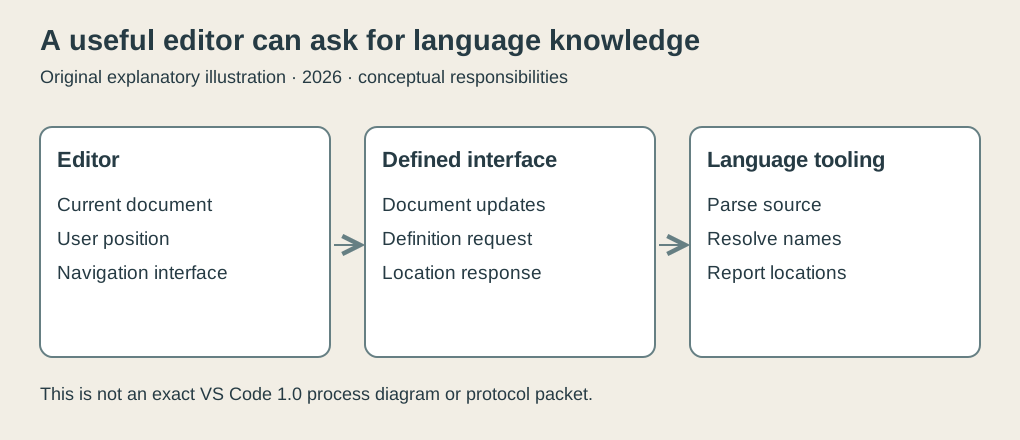
Original explanatory diagram, 2026. The editor presents a result supplied by language tooling. This illustrates the division of responsibilities, not an exact VS Code 1.0 process layout or screenshot.
June supplied another part of the story
On June 27, 2016, Microsoft announced industry adoption of a common language server protocol with Red Hat and Codenvy. This was later than the 1.0 release. The underlying language-server approach already existed; the announcement made the shared protocol and cooperation explicit.2
The account describes notifications when a document opens, changes and closes, plus requests such as Go to Definition. A response can identify a document and a range within it. The editor uses that answer to navigate. JSON-RPC carries the exchange.
The attractive engineering idea is reuse. A tool implementing the client side can ask a compatible language server for language knowledge. The server needn’t be written in the editor’s language. Nor does each editor necessarily need an entirely separate implementation of the language’s analysis.
That is a direction for architecture, not a claim that every VS Code 1.0 feature used this protocol or that all combinations instantly worked. Extensions and language servers are related concepts with different scopes. An extension can do work other than language analysis, and language tooling can integrate by other means.
An invented language makes the question visible
Consider a tiny teaching language with named functions. Here is an invented document:
let width = 4
fn area(w, h) = w * h
let total = area(width, 3)
We will ask where the area on the third line is defined. This example describes an ASCII-only semantic model, not a real language supported by the launch editor or an exact protocol packet.
A text search can find two occurrences. One is the declaration on line two; one is the call on line three. Choosing the earlier occurrence happens to work here. Add a comment containing area, or another function with a local name that shadows it, and that shortcut can fail.
A language tool has a more structured route. It can parse the second line as a function declaration, record area in a symbol table, then resolve the call against the names visible at that point. A symbol table is a mapping from names to information about what they denote. In this deliberately small language, a single document-wide scope is enough.
The definition begins at zero-based line 1, character 3. The name occupies the half-open range [3, 7): include character 3 and stop before character 7. The call begins at zero-based line 2, character 12 and occupies [12, 16).
The editor knows where the user requested navigation. The analysis knows which declaration that occurrence denotes. Combining those facts produces an answer with a document identity and the definition range.
| Item | Zero-based line | Character range |
|---|---|---|
Function declaration area | 1 | [3, 7) |
Function call area | 2 | [12, 16) |
These coordinates are intentionally ordinary. They keep the worked example focused on the exchange. Real tooling must handle character encodings, multiple files, scopes and language rules; the small model does not establish any historical implementation’s treatment of those details.
The file on disk can be behind the conversation
Now edit the document without saving it:
let width = 4
fn surface(w, h) = w * h
let total = area(width, 3)
The declaration changed, but the call did not. An analyzer that reads only the old file on disk may still report a perfectly good definition for area. That answer belongs to the wrong document state.
This explains why opening and changing documents are significant protocol events. The language tool must analyze the text that the editor currently holds, including unsaved work. A file path alone does not tell it what the user is looking at.
In our model, the new symbol table contains surface and no longer contains area. The call should therefore receive an unresolved-name diagnostic instead of a definition result. Change the call to surface, and both declaration and use agree again.
A diagnostic is information about a problem, commonly including a location and a message. The interface can underline the call and present the explanation. It doesn’t have to rediscover the language rule that produced it.
Our original checker walks through these three document states. It checks that the initial call resolves, that the incomplete rename fails to resolve, and that the completed rename resolves to the new declaration. It also checks the coordinate arithmetic. It is a small model run in modern Python, rather than a VS Code extension or a test of a 2016 server.
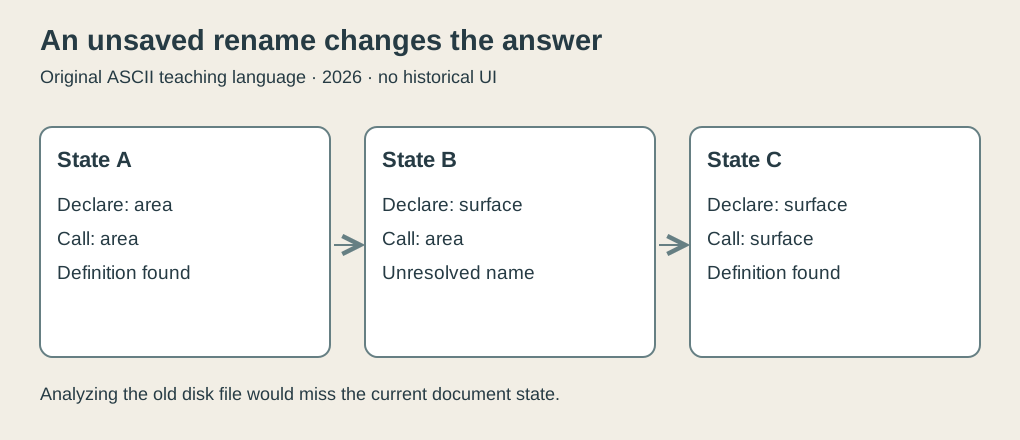
Original explanatory diagram, 2026. An unsaved rename changes the meaning of the current document. The three states are invented and do not reproduce protocol messages.
A reply also has a past
Separating analysis from the interface introduces time. A request can be sent, an analysis can begin, and the user can edit again before the response arrives.
Suppose the first request concerns document state A, where area exists. Before its answer returns, the document becomes state B, where the declaration is surface. Presenting the old answer as if it describes B would confuse the user.
This is a general consequence of asynchronous analysis. Tool builders need a policy for stale results: track document state, update analysis, and decide which answers still apply. Our teaching model labels successive states A, B and C to make the issue visible. It doesn’t assert the exact request cancellation or version-handling policy of VS Code 1.0.
The same consideration applies to diagnostics. An underline can be correctly computed and incorrectly timed. Fix the call while an earlier analysis is running, and a late diagnostic can make a repaired line appear broken again.
The interesting tradeoff is that responsiveness and immediate completeness pull in different directions. Waiting for all analysis after every keystroke would be a poor typing experience. Letting work run separately keeps the interface responsive, while requiring care about which result is being shown.
That care is part of the product. A clean separation on an architecture diagram is the beginning of an interface contract, not the end of the debugging session.
Reuse changes who must know what
Imagine three editors and four language tools. If every editor has a distinct interface to every language tool, there are twelve possible editor-language integrations to construct. A shared protocol can organize the work around three clients and four servers instead.
The numbers explain the potential, with suitable restraint. Seven components are not guaranteed to be cheaper than twelve integrations. Capabilities differ, implementations have bugs, and users want features beyond a common minimum. But an agreed interface gives participants a place to concentrate compatibility work.
The division also preserves specialization. A language team can improve name resolution or diagnostics without designing an entire desktop editor. An editor team can improve navigation and presentation without implementing every language’s parser and type checker.
A stable extension API serves a related purpose inside the product: it tells contributors where their code can connect and which expectations the host intends to preserve. That is why stability mattered at 1.0. An ecosystem is difficult to build when yesterday’s attachment point disappears every morning.
The ordinary action carried the architecture
VS Code’s early appeal can be explained through modest actions: navigate to a definition, see an error, step through a program, inspect a change. Their usefulness depends on many components agreeing about the same work.
The 2016 milestones gave those components clearer places to meet. April stabilized an extension boundary in a cross-platform editor. June described a shared route between tools and language servers. Keeping the dates separate makes the achievement easier to understand.
The editor didn’t need to know everything. It needed to ask useful questions, supply the current document, and present the answers without losing track of what had changed. For an application whose user may produce several changes while waiting for one answer, that is already a substantial job.
Footnotes
-
VS Code Team, Visual Studio Code 1.0, April 14, 2016. Release, architecture and extension milestones; platform qualification appears in “Being 1.0.” ↩
-
VS Code Team, A Common Protocol for Languages, June 27, 2016. The worked language, coordinate example and asynchronous scenarios are original teaching models. ↩